You have several options regarding the time and date stamps on your Blogger posts. Read on to learn how to post date and time blog publish Blogger for a future date, use the current date and time automatically and edit date and time stamps on current blog posts.
Automatically Publish with Current Date and Time Stamps
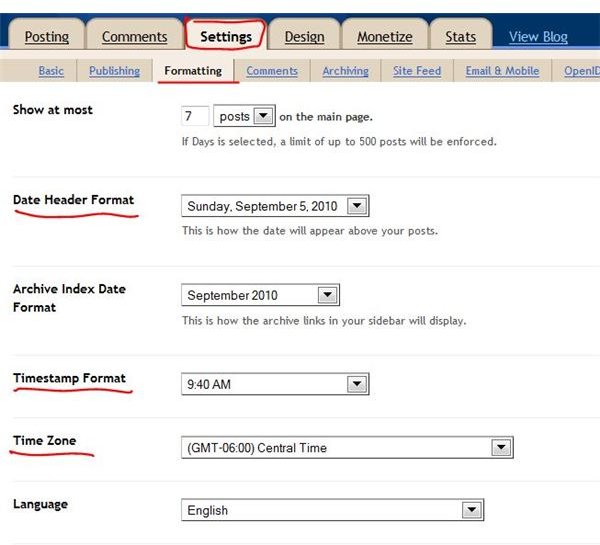
Before you begin to publish your blog posts, make sure your account has the correct time zone selected. Log into your Blogger account and click on Settings. Click on Formatting just under the Settings tab. Choose an option in the Date Header Format list as well as the Timestamp Format list if you want to change how the date and time blog published appear. Make sure your time zone is selected in the Time Zone list, changing it if necessary. Click the Save Settings button when you are finished.
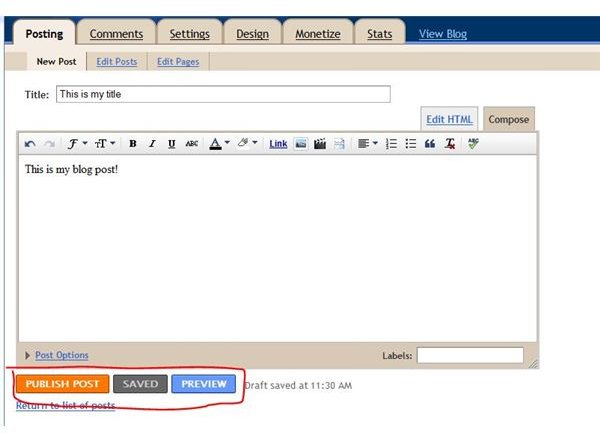
Publishing a blog post automatically on Blogger is quite simple. Click on New Post. Enter a title for your blog post in the Title field. Compose your post and use either the formatting features on the toolbar to format your text, add links and insert pictures or go to the Edit HTML tab and use HTML to compose your post.
Once you are ready to publish your post, you can simply click the Publish Post button at the bottom of the new post form. This will publish your post instantly with the current date and time stamps. You can also click Preview if you would like to see how your post will appear before you publish it.
Post Date and Time Blog: Publish Blogger at a Future Date
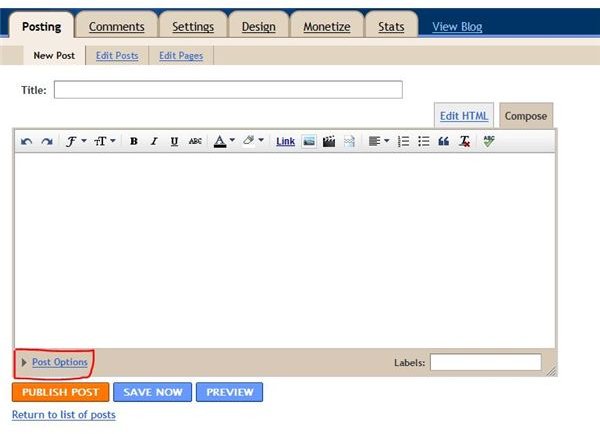
To set your blog post to publish at a future time and date, log into your Blogger account and compose a new post as described in the previous section. Instead of clicking the Publish Post button, however, click the Post Options link at the bottom of the form.
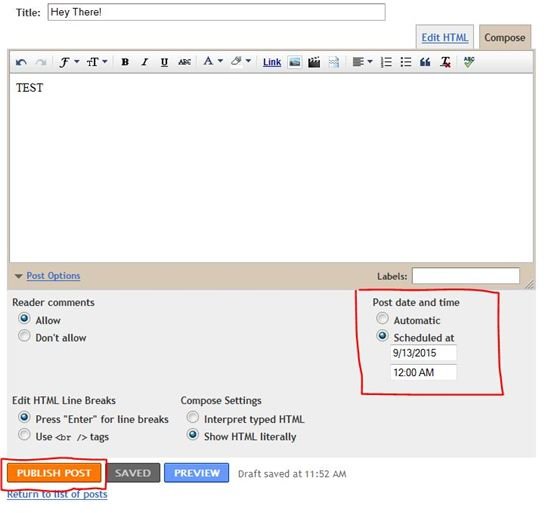
This presents several additional options. To publish at a future date, select Scheduled At under Post Date and Time. Enter the date and time you want the blog post to publish in the boxes beneath Scheduled At. Click the Publish Post button to save your blog post and set it to publish at the date and time you specified.
Edit Time and Date Stamps on Existing Posts
At some point, you may wish to change the date or time of an existing blog post in Blogger . For instance, you may decide that certain posts make better sense listed in a different order. To edit the time or date stamp of a post, log into your Blogger account and click on Edit Posts. This displays a list of your blog posts and several options. Click on Edit directly to the left of the blog post for which you want to change the time or date stamp.
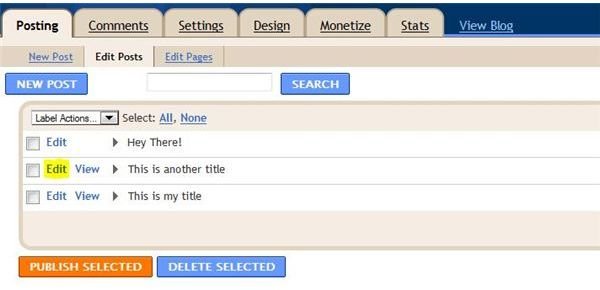
Click the Post Options link at the bottom of the blog post form. Select Set Date and Time under Post Date and Time. Enter the new date or time you want to use, even if it’s in the past. Click Publish Post to save the changes and publish your post with the new date or time stamp.


