Setting up a sync between Groupwise Calendar and Google Calendar is a great way to stay in touch with your appointments if you don’t have MobileAccess or WebAccess
Why Would I Sync Groupwise Calendar with Google Calendar?
GroupWise is Novell’s popular alternative to Microsoft Exchange and Outlook, offering many of the same email and time management tools. GroupWise has a WebAccess facility as well as a mobile sync tool – but if neither of these have been setup, or there is some sort of network disruption where they are hosted, you might find that you cannot get the information you need.
While there is no way to sync GroupWise calendar with Google while one of the services are offline, you can configure GroupWise to add appointments to your Google Calendar with the minimum of fuss, and avoid problems further down the line.
This is done by means of a conditional rule.
Conditional Rules in GroupWise
There are many uses for conditional rules in GroupWise – commonly, they are used for out of office messages and forwarding messages to secondary or delegate accounts.
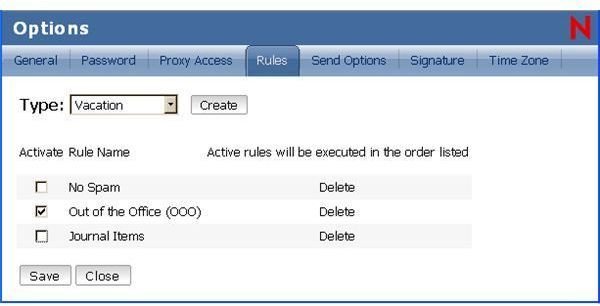
In order to sync GroupWise Calendar with Google Calendar, you will need to login to GroupWise and create a rule.
What the rule does is set a condition about the type of event in your Calendar; the condition is set to forward the event to your Gmail account, where it is then deleted.
Deleted? Yes – when an event is forwarded to Gmail, it is automatically set up in your Google Calendar. By deleting it (an optional choice) you prevent it from cluttering your Gmail inbox.
How to Sync GroupWise Calendar with Google Calendar
Your sync of GroupWise Calendar with Google Calendar can be set up by opening GroupWise. From here, create a rule:
“When event is Filed to Calendar folder and if condition is Appointment, Add Action to Delegate to: name@gmail.com Comments to recipient:GWDelgate"
Remember to set name@gmail.com to your actual Gmail address!
Next, open Gmail in your browser, and create a filter (Settings > Filters > Create a new filter). This filter should be set to pick up your GroupWise email address in the From: field, and to filter based on the term “GWDelegate” in the Has the words: field.
Click on Next Step, and either set the Action to Delete it, Skip the Inbox (to archive the event) or simply go straight to Create Filter to save the Action without moving the forwarded message.
That’s it – you have now synced GroupWise calendar with Google Calendar!
Mobile Sync Options
If you use Android, and you have used your Gmail account above that is associated with your mobile device, then you’ll find that your mobile will alert you to your appointments after setting up the rule as described in the previous section.
Whichever mobile platform you use, a suitable Google Calendar sync tool will be needed to get the full mobile benefit from this procedure. Meanwhile you can still get the calendar information you need from GroupWise by opening Google Calendar via your web browser.


