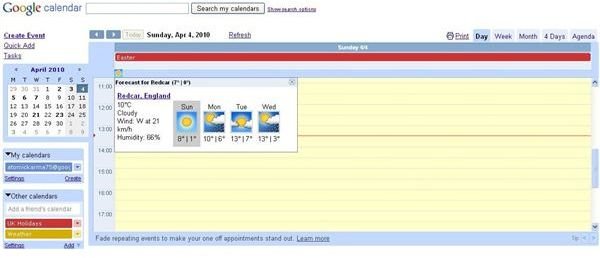
This great tip explains how it is possible to embed weather into Google Calendars by making a couple of small adjustments to your calendar setup.
Display Weather in Google Calendar!
Google Calendar is a great online diary application that enables you to set events and appointments, stay up to date with tasks, and generally manage your time effectively.
By synchronizing Google Calendar with other calendar systems (such as Windows Live or Outlook) you can unify your diary data into one central online resource, and with Google Talk you can even get desktop pop-up alerts advising you of an impending appointment or event.
There is so much you can do with Google Calendar, from setting it up as your main calendar utility to even displaying the forecast weather on particular days.
Benefits of Weather Embedded Google Calendar
Why would you want a weather embedded Google Calendar? For starters, it would enable you to plan how a certain event might proceed. For instance you might have an outdoor wedding in a marquee planned. To discover that a heavy, hurricane-strength wind is likely on that very day would force you to consider alternative arrangements with the venue.
The beauty of embedding weather into Google Calendar is that the system forces you to choose a location. This can either be your own home, the place you work or somewhere you are travelling to – it doesn’t matter as the location can be changed as easily as it can be set up.
Setting Up Weather Embedded Google Calendar
To make the most out of this particular feature of Google Calendar, begin by opening a new browser window and signing in to Google. Next, go to Google Calendar (either via www.google.com/calendar or via the More drop-down menu across the majority of Google pages, visible only when signed in.)
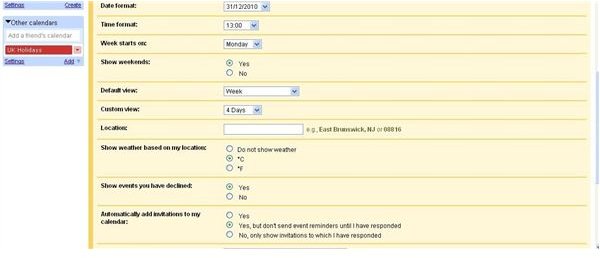
Initial observation of the calendar will reveal little – to setup weather embedded Google Calendar, go to Settings > General. Halfway down the page you’ll see two fields, Location and Show weather based on my location.
First of all, enter the location that you want weather to be displayed for, before choosing between °C and °F to set up the weather information.
Click Save when you have finished – then view the results in Google Calendar!
Using Weather Embedded Google Calendar
With a weather embedded Google Calendar, you have the benefit of real-time weather information being displayed on your desktop.
A four day forecast period is available – and while you should never take complete notice of what a weather forecast tells you, this information is really useful when coupled with your Google Calendar.
A small weather icon will be available against each cell of your calendar in the same row as the date in Month view, while in Day view it will be stripped across the top under the date. The weather icon will provide an idea of the weather expected using traditional weather forecast notation – clouds for an overcast day, a yellow sun for sunshine, etc.
Clicking the icon will display more detailed information such as temperature, humidity, and wind speed – vital information delivered via weather embedded Google Calendar!


