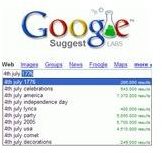
PC users can find the right words to search for with the help of Google Suggest. This feature will identify as well as suggest words and/or numbers for the search.
What is Google Suggest?
When searching with Google, are you ever unsure of what to look for? Do you ever wonder how to spell a word or the name of the person you are searching for? Do you ever wish to find a better way to research a subject? Google Suggest, which has been available since August 2008, can help you with all that. It is available internationally (available to 155 domains in 51 languages).
Google Suggest uses javascript code to look at what is being typed in the Google Suggest-style search box. Users begin typing a letter or number, and the search box displays suggested words. This helps users identify the needed search string quickly as well as eliminate any further typing on their part. Furthermore, it shows how many results there are for the displayed search strings. When the right string of words is identified, just press “Enter” to begin the search.
Why use it?
Suggest allows Google to see if the words make sense in the context of your query. In addition, it helps to formulate queries and reduce misspellings–by detecting misspellings and showing suggestions that include the properly spelled keywords. It also helps save keystrokes too. Selecting a suggested search query may also help eliminate irrelevant search results .
Besides, it comes in handy, and is very helpful, when you want to type a complicated name. Users only need to remember the first letters to receive results. Most importantly, it autocompletes the word you start to type. In brief, it provides search suggestions.
Note: Users can select from a number of Google Suggest results or explore other related searches that are suggested.
How to narrow search results?
- Use Google Instant Search to display how many results per page.
- Add new keywords to an existing query.
How to Enable and Disable Google Suggest
To Enable Google Suggest
1. Go to the Google Web site.
2. Beside the search box, Click on Preferences
3. Select the option: Provide query suggestions in the search box
To Disable Google Suggest
1. Go to the Google Web site.
2. Beside the search box, Click on Preferences
3. Select the option:: Do not provide query suggestions in the search box
Pros and Cons
Pros
-
It provides real-time suggestions while you search
-
It displays possible typed matches for entries
Advertisement -
It helps spell out words
-
It adds information that may be pertinent to the search
Advertisement -
It offers results in real-time
-
It helps to make searches even faster
Advertisement -
It contains search queries to quickly find what is wanted
-
It Is able to detect all previously queued searches
Advertisement
Cons
-
It automatically tries to guess what you are looking for
Advertisement -
It uses online content from previously used search histories
-
It determines what you are searching for
-
It can be annoying to see suggestions pop up
Image credit: Google Suggest Search


