Yahoo! People Search is a free service that allows you to find people’s address details, phone numbers and emails in the United States. You can also update or remove your listing at any time. Here’s how to use People Search effectively.
The more details you have, the better chances you have of finding a person using Yahoo! People Search.
**
To Find an US Phone and Address
1. Go to the Yahoo! People Search
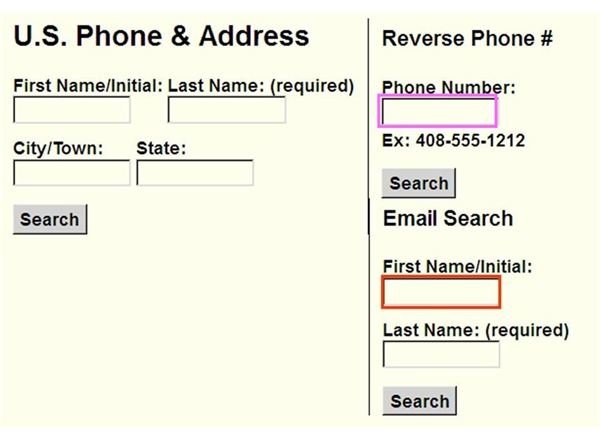
2. On the U.S. Phone & Address option (see the screenshot), type First Name/Initial, Last Name (required field), City/Town, or State.
3. Click the Search button
If the result doesn’t show up, you might need to broaden your search by entering fewer search criteria such as leave the First Name/Initial, the City/Town or the State blank, only fill the Last Name field. If you still can’t find the person, she/he might not have a publicly listed phone number and address.
To Find an Email Address:
1. Go to Yahoo! People Search
2. In the First Name/Initial text box (see red rectangle in the screenshot above), type the person’s first name or his/her initial.
3. In the Last Name text box, type his/her last name.
4. Click the Search button**.**
To Reverse Phone Number Lookup:
You can also search for names and addresses by phone number.
1. Go to Yahoo! People Search
2. In the Phone Number: text box (see pink rectangle in the screenshot above), type the phone number
3. Click the Search button,
Add, Edit and Remove Your Listing
Yahoo! People Search listings come from Intelius, a third party who licenses the Yahoo!’s data. The Intelius database is out of Yahoo!’s control, so if you want to update your listing then you have to send your information via the Yahoo! feedback form. Or, if you don’t want your listing to be viewed by the public, you can request to remove it at any time.
To Get a Entry or Edit Your Listing
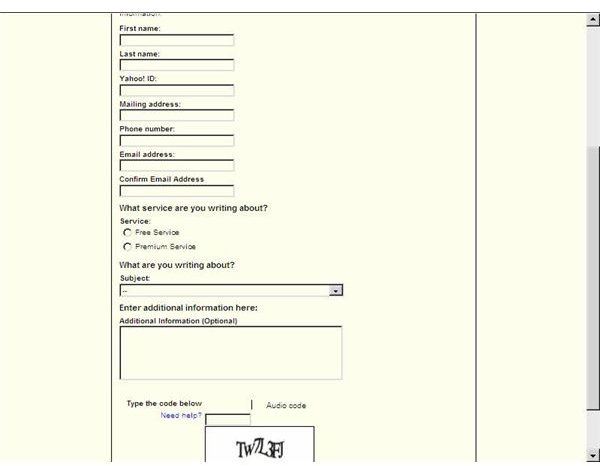
1. Go to Yahoo! People Search Help Form (see the screenshot) and fill out the form.
2. Click Submit to send your information. It can take up to a week to be added or edited due to lag times in updating the information and it could take up to six months for the changes to show in the Yahoo! People Search.
To Remove Your Entry
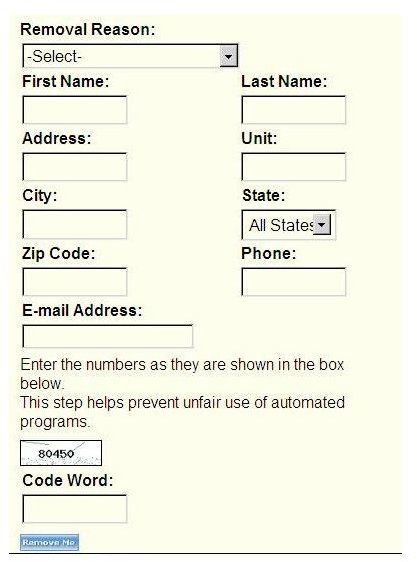
1. Go to Removal Form (see the screenshot)
2. Select Removal Reason, for example, General Privacy Concerns
3. To successfully remove a listing from Yahoo! People Search Directory, you can choose one of two filling combinations:
- First Name, Last Name, City, State, Zip Code and Phone Number. Or,
- First Name, Last Name, City, State, Zip Code and Address.
4. In the Code Word box, type the numbers as shown in the box.
5. Click Remove Me. Your removal request will be processed in one business day.
References and Further Reading
Our Favorite Name Search Engines
How to Google People from Alternative Search Engines
Authors own experience
Screenshots taken by author


