There are various options and controls in Google AdWords, but those that relate to your account settings are hidden in relation to those that configure your adverts. Find out how to find and alter your account details with this guide.
How to Configure Your Account Settings
Google AdWords, the popular tool for creating adverts based on keywords, operates on two different levels. At first glance it is a simple system to get started with, offering all of the features and options that a newcomer to search engine advertising could possible need.
In addition to this, however, Google AdWords also offers tools for the advanced user, allowing him or her to collect various statistics about their adverts, create campaigns and generally measure success or failure.
As Google occasionally rearrange things in the user console from time to time it can be tricky to find regularly used tools – such as the most vital, the AdWords preferences tool for updating your personal and banking details!
Finding Your Preferences
The various preferences that you can configure in Google AdWords control your personal information, as well as various settings as to how the menus behave, etc.
In order to access the Preferences menu, you will first need to log in to Google AdWords, either by signing into Google and clicking your name in the top-right corner and select Account Settings > AdWords, or by browsing to adwords.google.com.
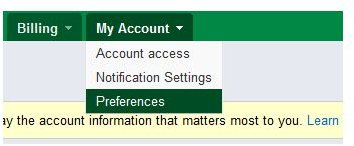
Across the top of the AdWords site, as you have probably seen before, are the various menus for using Google AdWords; in the My Account tab you will find Preferences!
Altering Your Preferences
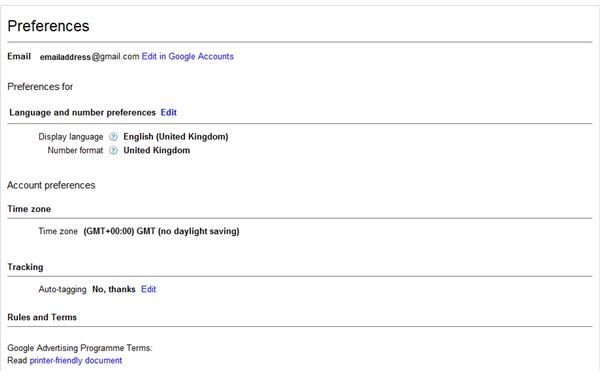
The basic preferences that can be configured in AdWords allow you to set international options such as Language and number settings (these can be altered by clicking Edit) as well as setting up a Google Sites page.
Your AdWords email address, meanwhile, can be edited via the Edit in Google Accounts button, and by clicking the My Account tab you can also access Account Access screen to Invite other users to access your AdWords account, as well as observe the Notification Settings that Google offer; these cannot be edited, however, so if you’re sick of receiving special offer email notices, you will have to grin and bear it.
Billing Preferences
In addition to the basic user preferences that can be configured in AdWords, you can also configure you billing preferences, a useful option for anyone wishing to alter the way they pay for adverts or receive payment.
Using the edit button beside each option, you can set Billing and Payment options, Primary Payment Details, Backup Payment Details, VAT Information and even add Promotional Codes for free credits!
There are of course many other settings that you can access in the Google AdWords account screens, all of which are designed to make the task of making money by advertising on Google easy.
For information on how to get started with Google AdWords, How to Get Approved for Google AdWords will provide you with all that you need to know.
Meanwhile, don’t forget that your account preferences are split into two main screens, My Account and Billing!
References
Author’s own experience.
Screenshots by author.


