Can anyone send a fax via Gmail account? Is there any advantage of sending fax message using e-mail?
Editor’s Note: This article, originally published in 2011, provides information on emailing to a fax machine using The Phone Company. This was a volunteer network which is now serving with limited capacity. We have archived this article but left it up for informational purposes. For more information on sending a fax via email, see this link: https://www.tpcint.org/tpc/index.html
Send a Fax via Gmail Account
Sending a fax message using Gmail account is useful to some people that are on the go. That is if the recipient requires a fax message instead of e-mail. As we know some company continues to request fax documents instead of e-mail attachments.
Fax machines or fax software can be used to send faxes using the computer (see Fax Capabilities of Windows 7 ), but it might fail if the Internet connection is using VoIP network. There is a way to send a fax using Gmail account or by using e-mail program that uses a Gmail account to send and receive e-mail messages.
How to Send a Fax Via Gmail?
To send a fax message using Gmail account is easily done by using the free fax service of The Phone Company (TPC). You can send a fax message to many areas in the world but not to all countries. The covered countries is United States, Canada, China, Botswana, South Africa, Greece, Bulgaria, Netherlands, Ukraine, Yugoslavia, Italy, Brazil, Australia, New Zealand, Indonesia, Taiwan, Turkey and many more.
Below are the steps to send a fax via Gmail:
- If the recipient of the fax message is covered by The Phone Company, you can send a fax. Verify by entering the fax number.
- If the verification page says you can send a fax to that particular number e.g. “You can send a FAX to this number”, simply login to Gmail to start sending a fax message.
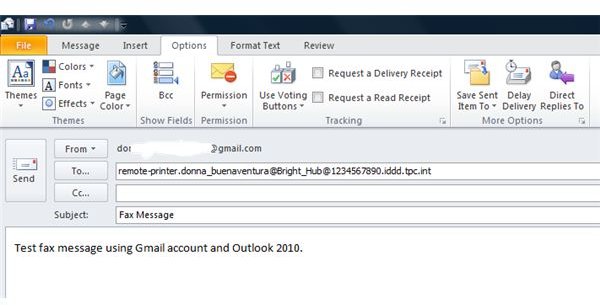
- Compose a new email message and then type remote-printer.recipient_name@fax_number.iddd.tpc.int in the “To” field, replacing the recipient_name and fax_number with the correct information e.g. remote-printer.donna_buenaventura@1234567890.iddd.tpc.int
- Type of text in the email message box, and then send the e-mail.
- The recipient will receive your message as fax message.
Note you can also send using another format: remote-printer.recipient_name/Company_Name_Here@fax_number.iddd.tpc.int or remote-printer@fax_number.iddd.tpc.int
The first format will add the company name in the fax cover sheet. The latter format will only send it to fax number without any fax cover sheet. It’s best to add the recipient name if the recipient is in office or in hotel so the person that will receive the fax will know who is the recipient of the fax message instead of trashing the fax message or fax paper.
Send a Fax Using Browser and E-mail Program
Gmail can be accessed using a browser and e-mail account which means you can send a fax message using Outlook, Thunderbird , Windows Live Mail applications. The only requirement is you will setup Gmail account in the email programs. The image at the left is an example how you can compose an email but will be sent as fax message.
Is it Safe to Send a Fax Using Third-Party Fax Servers?
Everyone should review the services by any company (even if it’s a non-profit organization). Sending e-mail is not private anyway especially if the sender is not using a secure e-mail . It’s recommended to not to send a fax message that has private information unless you trust the fax and e-mail servers. Read also the article about fax security issues and how to secure it .
This article has been placed in our archives.


