
Is Mozilla Firefox giving your PC some performance issues? This article investigates some of the causes of these problems, and makes suggestions as to how you can resolve them.
Mutiple Tabs, Slow Firefox?
Using multiple tabs is a great way of keeping several web pages open in a single instance of your browser, and has become increasingly popular since introduced by Mozilla with the first Firefox release, so much so that almost every other browser includes this usability feature.
In most cases it is OK to leave several web pages open for any length of time – but you might find that certain websites cause a problem, and lead to performance issues, both within the browser and on your PC.
The reason for this is because Firefox is taking up a greater share of the CPU than it should. This can be stopped by tracing the cause – usually a web page or advert within that page.
How To Stop Firefox from Hogging the CPU
To begin, you will need to trace which of your Firefox tabs is using up your CPU. By doing this, you should be able to then prevent it from happening in future, or at least be aware which of your regularly-visited pages is causing the problem.
A visual check of your tabs – assuming things haven’t slowed down so much as to make Firefox impossible to use (see below) – should reveal at least one tab with content that would cause a big slow down and CPU hogging.
Such content might include:
• Video content
• Scrolling text
• Animated adverts
• Overlayed adverts
These types of content are usually hosted by a third party website and served to the site you are visiting. As such the web site you are visiting has little control over them. Additionally, Flash content can cause a big problem, especially on older systems with single core CPUs.
Closing any tabs displaying this sort of content should fix the problem – however this isn’t guaranteed to work.
Forcing Firefox to Close
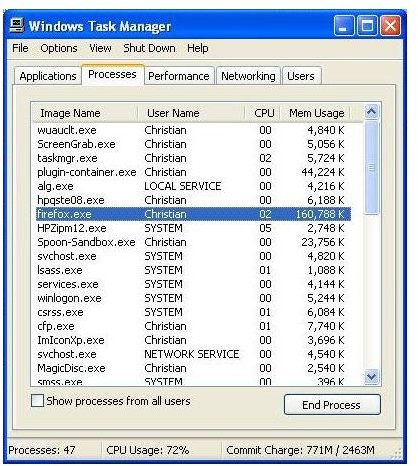
Even when the tabs featuring the CPU hogging content are closed, there is still a chance that the problem will remain. This is because the processing of these adverts, videos or whatever is still taking place. By opening Task Manager (CTRL+ALT+DEL or right-click on the Windows taskbar and select Task Manager) you should be able to see the CPU and RAM resources being used by Firefox.
If you check this straight after closing the problematic tabs, you’ll see that the Mem Usage doesn’t decrease, but instead increases!
In this situation, selecting firefox.exe in Windows Task Manager and clicking the End Process button is the only way to proceed.
Prevention is Better than a Cure
Obviously, quitting out of Firefox every time it gets slowed down by adverts isn’t ideal. It’s quite possible to have 30 or so ad-free tabs open and not have problems, however, so I would suggest taking advantage of an ad-blocking tool.
Several browser additions are available for Firefox users via the Tools > Add-ons page – simply search for “ad block” or “flash block”. These tools are designed to block such content from downloading when you visit a web page. Usually, you can activate the content once the page is downloaded, thereby placing control of potentially resource-draining content in your hands!
If you locate a site that pushes malicious or annoying ads, you may also consider getting an add-on to block websites in Firefox .


