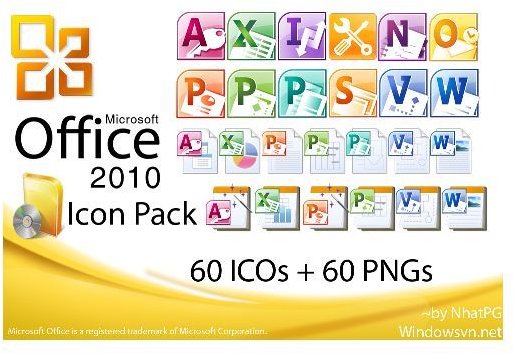
Customise your Microsoft Office install with these great Office 2010 icons!
Download the Microsoft Office 2010 Icon Pack
Are you looking for Microsoft Office 2010 icons? The icons from the latest version of Microsoft Office can be used to illustrate documents and new images for each of the following are available online:
- Microsoft Access 2010
- Microsoft Excel 2010
- Microsoft InfoPath 2010
- Microsoft Office 2010 Upload Center
- Microsoft Office SharePoint Designer 2010
- Microsoft OneNote 2010
- Microsoft Outlook 2010
- Microsoft PowerPoint 2010
- Microsoft Project 2010
- Microsoft Publisher 2010
- Microsoft SharePoint Workspace 2010
- Microsoft Visio 2010
- Microsoft Word 2010
The icon images for each of these applications can be downloaded from various websites following their initial appearance on DeviantArt.com – I would suggest using the Microsoft Office 2010 IconPack provided by user NPhatPG .
Converting Icons
The icons in the pack above are in PNG and ICO format - but if you download from a pack with no ICO files included you will need a converter program. Once you have downloaded your chosen icon pack, extract the icons into a folder on your PC or laptop, then visit www.convertico.com . Upload each of your icons in turn, and save the resulting ICO files.
Then, using the instructions below, you can setup your new icons as the default icons for your version of Microsoft Office!
Using Microsoft Office 2010 icons
So – what would you use these Office 2010 icons for? Well, for starters, you could change the icons on your current version of Office!
To use these icons on your PC, you will need to update the file type options. This allows you to then use these new Office 2010 icons on your older version of Microsoft Office. Note that the same procedure can be applied to any icon pack.
Open My Computer, and go to Tools > Folder Options > File Types. Here, select the file type you wish to update, then go to Advanced > Change Icon… and Browse to find your new icon files.
Similarly, an application icon can be changed by browsing to its folder, right-clicking on the icon and choosing Properties > Shortcut > Change Icon…. Again, Browse for the icon file that you want to use instead, and click OK and Apply to make the change.
Find out more about customising Windows icons in our Guide to Desktop PC Icons .
Alternative Microsoft Office 2010 Icons
You don’t have to use these images, however – as well as the original icons, you can download alternative Microsoft Office 2010 icons and use them for similar purposes.
After all, as good as the Office 2010 icons are, they’re still not as funky as the Mac OS X version. Which seems to have been Akkasone’s starting point – download this great alternative Office 2010 icon pack from akkasone.deviantart.com
This selection from minhtrimatrix meanwhile offers a brand new spin on the four main Office apps and they make great desktop icons for Windows 7.
Finally, you might like Pixellover’s selection of Microsoft Office icons , again designed for use with the latest release.


