Microsoft Office comes with a wealth of template features - these come into their own in Word, with templates that assist you in creating greetings cards one of the most popular of those included.
Make Your Own Cards with Microsoft Word
Making your own greeting cards is great fun, not to mention very satisfying for the recipient who has been given something that has had some real effort put into it as opposed to something mass-produced from Hallmark.
There are many ways to make your own cards. One of these is to make use of templates that can be loaded into Microsoft Word, which you can then edit and arrange as you like, type a message to the recipient and then print out.
Templates take many forms, from all-in-one cards that you print onto a sheet of paper and fold up into a card to giving a selection of different card fronts that can be printed and cut out.
Finding Free Microsoft Office Greeting Card Templates
Searching online for the best free Microsoft Office greeting card templates for use in Word is a good idea – but don’t forget to start your search closer to home.
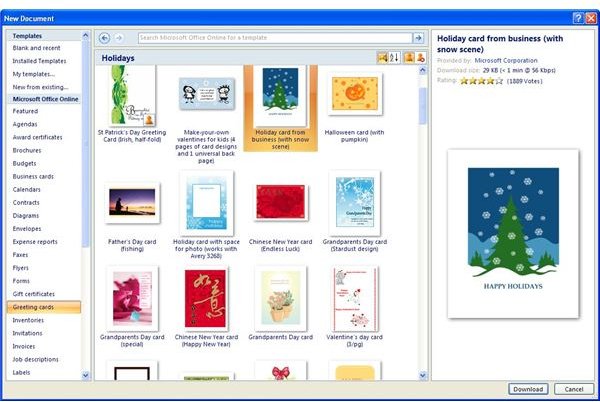
Microsoft Word comes with access to Office Online built-in. Here you can find several templates, including a good selection of greeting card templates. To access these:
Open Word, and start a New document (File > New or in Word 2007 Office Button > New).
In the New Document window, under Microsoft Office Online, browse for Greeting Cards. This section is split into different card types, such as Sympathy, Get Well, Thank You, etc. Each one of these sub-sections has small previews of the cards displayed – click on Download to add the card template to Microsoft Word.
Other Places to Find Templates
A selection of other websites provides free Microsoft Word templates that are ideal for use as greetings cards. One such site is www.wordtemplates.org where you will find several suitable templates.
Meanwhile, worldwinpapers.com features a range of greeting card templates for different occasions, complete with instructions and guidance on how to use them.
Templates from either of these resources (and there are many more online) can be downloaded to your PC and opened in Word, ready for you to customise and use as your own greeting cards!
Using the Greeting Card Templates
Once you’ve downloaded a Microsoft Office greeting card template that suits your needs, it is time to use it. After saving it to your PC, double-click the file to open it in Word. In most cases, templates for use in Microsoft Word are equipped with instructions – these are often styled as part of the finished document.
In order to change the card template so that it has the words and any images you want to use in it, simply left-click and drag your mouse over a section of text and over-type your own words.
You may need to do this several times – when you’re happy go to File > Save As (Office Button > Save As in Word 2007) to save the file with a memorable name before printing.


