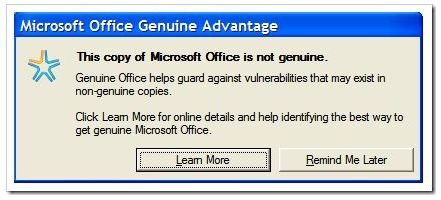
If you are a legitimate user and you receive this message in error, there are ways to fix it, quickly and easily. Here’s how…
Microsoft Office Genuine Advantage (OGA) Notification
Are you receiving the “this copy of microsoft office is not genuine” message and does the following notification appear every time you open Word or another Office application?
Windows XP/Vista
Windows 7
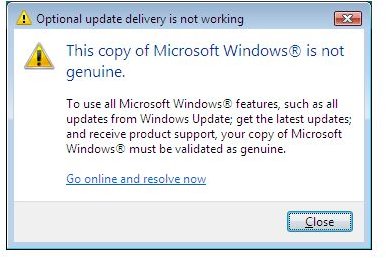
Clicking on ‘Go online and resolve now’ or ‘Learn More’ opens a website that explains why you see this message, but it offers no real information on how to rectify the issue. You can click on the Remind Me Later button, but if you click this button, an icon will be placed in the Windows notification area. If you double click this button it will show more information about the error message and offer solutions on how to validate your copy.
When you receive this notification you have two possible options, you could uninstall Office from your computer or purchase a license online from the Microsoft website. If you are using a counterfeit or pirated copy of the software, you should follow one of the above mentioned steps.
It is possible that legitimate users, with legal copies of the software, could still receive this notification, and in a situation such as this there are other ways to solve the issue. The notification you receive is triggered by an application that is installed on your computer, but the application will not prevent the software from functioning, or from being used. You should still be able to use all the features of Office, and get updates from Microsoft, but the notification message can become annoying in time. If you are a legitimate Office user, and need to rid yourself of this annoying notification trying the steps below could help to resolve the issue.
Image credit: microsoft.com
Windows XP & Windows Vista
Method 1
1. Save your work and close all the open Office applications
2. Navigate to the following Windows folder: C:\Windows\System32 for Windows XP or C:\Windows\SysWow64 for Windows Vista.
3. Find the following files (You can use CTRL+F to make the search easy) and delete them:
- OGAAddin.dll
- OGAVerify.exe
Method 2
1. Open Windows RUN dialog (Press Win Key + R), enter “regedit” (without quotes) and hit Enter.
2. Navigate to the following registry key paths:
-
HKEY_LOCAL_MACHINE\SOFTWARE\Microsoft\Office\Powerpoint\Addins
Advertisement -
HKEY_LOCAL_MACHINE\SOFTWARE\Microsoft\Office\Excel\Addins
-
HKEY_LOCAL_MACHINE\SOFTWARE\Microsoft\Office\Outlook\Addins
Advertisement -
HKEY_LOCAL_MACHINE\SOFTWARE\Microsoft\Office\Word\Addins
3. Expand each of the above registry paths and delete OGAAddin.connect.
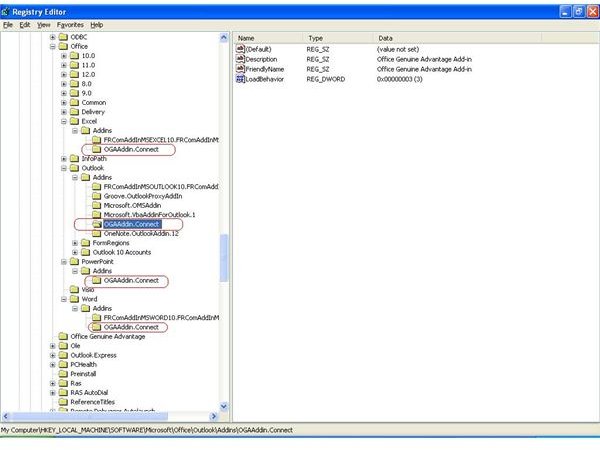
Image Credit: squidoo.com/OGArem
Windows 7
1. Open C:\Windows\System32 or C:\Windows\SysWow64
2. When you’re there, find the following files (Use CTRL+F to search for the files):
- OGAEXEC
- OGAAddin.dll
- OGACheckControl.dll
3. Delete all of these files.
Note: You can rename the files instead of deleting them. It is recommended because if anything goes wrong you can undo any changes by restoring the original file names.
Either of the above mentioned methods can be used to remove/disable the Office Genuine Advantage notifications that say this copy of Office is not genuine, but if you choose to implement these methods, you should disable Windows Auto-update. This will prevent the notification application from being installed again.


