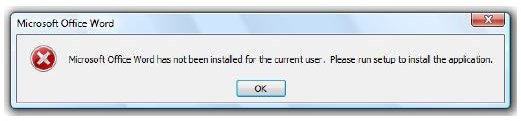
If you are in search of a solution you have come to the right place. The error message stating that MS Office has not been installed for the current user can be fixed by following these simple steps.
Fixing The Problem
Many Microsoft Office users have received the error message, “Microsoft office word has not been installed for the current user, please run setup to install the application.” This problem is generally caused by a patch that is installed automatically through the Windows Update facility.
You may receive a similar message when you run other Microsoft Office applications such as Outlook, Excel, Access and PowerPoint and in most cases, reinstalling Microsoft Office will not fix this issue.
If your copy of Office is genuine, it may be worth visiting a Microsoft support web page. Microsoft offers a solution to ensure all users have permission to alter the Opa11.dat file, located in C:\Documents and Settings\All Users\Application Data\Microsoft\OFFICE\DATA). This solutions works, but only in cases where non-administrative accounts do not have permission to alter files that are used by Office 2003 or XP setup program. Some users try to rectify the issue using the System Restore facility, but there is a much simpler method.
A file that is related to the Office application causes the “Microsoft Office has not been installed for the current user” error message . The file name is MSO.DLL and its location depends on the installed version of Microsoft Office.
Office 2003 - C:\Program Files\Common Files\Microsoft Shared\OFFICE11
Office 2007 - C:\Program Files\Common Files\Microsoft Shared\OFFICE12
Office XP - C:\Program Files\Common Files\Microsoft Shared\Office10
This file is a Microsoft Office component that has been changed by Microsoft to generate the ‘Microsoft Office Has Not Been Installed for the Current User’ error message. It displays the message when it detects that an unlicensed copy of Microsoft Office is installed on a computer. Uninstallation or repair attempts leaves the MDO.DLL untouched, and this explains why these methods will not remove the error message.
Image credit: robertmccarter.com
Removing the MSO.DLL file
The simple way to get rid of this error message is to search for the MSO.DLL file, and to remove it. Then repair or reinstall Microsoft Office and the file will be restored to its original state from the Office installation disc. There will be a prompt to insert the installation disk during the install or repair process, so keeping the disk close at hand.
Another reason for this error is that you may be using an unlicensed copy of Office software, and you have recently installed the latest Office updates. If this is the case, you should purchase a license and this will also remove the error message.
Copying software, or using pirated software is always discouraged, however, if your copy of Microsoft Office is genuine and you still receive this error message you can try the first method detailed above. If that does not resolve the issue try the second method and you will not have to deal with this error message again.
Final Word
Since installing the latest updates will alter the MSO.DLL file, it is recommended that users avoid updating the Office installation. This will prevent the error message from appearing again. If for some reason the software still updates after having fixed the issue, the methods outlined above can be used again.
Reference
You receive a “Microsoft <Program_name> has not been installed for the current user” error message when you try to start an Office 2003 program or an Office XP program for the first time, Microsoft


