From time to time, SharePoint acts in unexpected ways. Specifically, menu items go missing. This is due in part to service packs that are missing on the system and the version of .NET framework not being the most current. Read on for tips on how to fix these issues.
The Origin of SharePoint Menu Problems
SharePoint is a browser based application, and it is designed to work with Internet Explorer 8. The current version, IE 8, presents some interesting elements for presenting content. One of these is that it decides which processing engine to use (with the display operations) based on code in SharePoint’s master page.
DocType
A DocType is a document filtering protocol. It sets the parameters for how applications will interpret a document that is not natural to them and how they will present that content – that is, in HTML format, XML format, or some other browser markup language format.
- If IE8 sees a DocType, it will present the site in Standards Mode.
- If IE8 does not see a DocType, it will present the site in Quirks Mode.
The SharePoint Master Pages
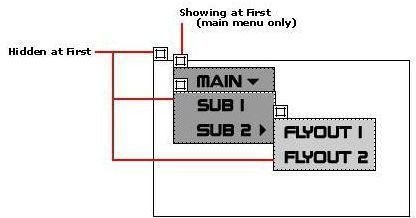
The master pages in SharePoint do not have a DocType declared, so IE8 will display the page in Quirks Mode by default. For the BlueBand.master page, which is part of the default SharePoint installation, IE8 will automatically attempt to render them in IE8 Standards Mode. But, this is a problem because SharePoint menus cannot show dynamic menu items (otherwise known as fly-outs) in IE8 Standards Mode.
This may account for some problems showing up with the menu displays.
Image Source: Fly Out Menu
Source: Problems with IE8 Standards Mode, SharePoint menus, and DocTypes
Examples of Missing Menus in SharePoint and HotFixes
If menu items are missing in SharePoint there are some workarounds and hotfixes.
1. Missing items in “Site Actions” menu
If you are missing items in your “Site Actions” menu such as the “Navigation” menu item, there is a simple fix.
HotFix:
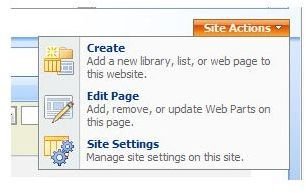
Activate “Office SharePoint Server Publishing” from Site Settings > Site Features .
2. Missing “Edit In DataSheet” Option In SharePoint Lists
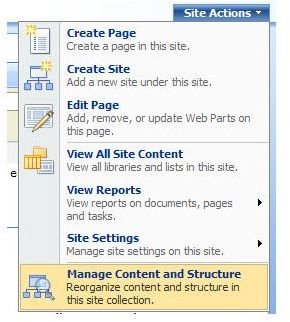
If the SharePoint lists do not have options such as Edit in Datasheet, Export to Spreadsheet, and Open with Access under the Actions Menu, here is the fix.
HotFix:
Go to: Central Administration -> Application Management -> Authentication Providers (Under Application and Security)
Then follow these steps: In the Authentication Provider’s section, go to the particular web application and select the Membership Provider’s Zone, and check that you have enabled the Enable Client Integration Option. Once this option is enabled, you will see those options for integrating with client application options on SharePoint lists.
3. “Connect to Outlook” Option Missing in Actions Menu
Another missing menu item that deals with e-mail shows how a potential problem may not really be one.
If the Outlook option does not appear in WSS 3.0, one reported fix is just to install Outlook. This hotfix works because there is limited support for Office 2003 clients with WSS 3 and Connect to Outlook needs to be enabled for WSS 3 or MOSS 2007. So generalizing this case, if some menu options from Office are missing in SharePoint, first try installing the application.
Image Source: Missing items in “Site Actions” menu
Summary
Missing menu items in SharePoint can be caused by IE8 working in Standards Mode, instead of Quirks Mode, depending on whether or not there is a DocType available to make a mode available. But several hotfixes are available for different types of missing menu items.
This post is part of the series: Troubleshooting SharePoint Services
While SharePoint may be a good working tool for collaborative purposes, there are times when it does not work as intended, and the user is left frustrated with some of those problems. In this series, we look at some troubleshooting techniques.


