You are using a new computer but feel lost without your contact information. Learn how simple importing address book from Outlook 2007 can be. You can import it into another instance of Outlook 2007, Outlook 2010 or into Windows Mail.
Overview
Importing an address book from Outlook 2007 is not very difficult at all. First you need to export the address book from Outlook 2007 on the original computer and then, as long as you have a flash drive or other removable media, you can import it to Outlook on another computer. You can also import your address book into Windows Mail or Outlook 2010.
Export from Outlook 2007
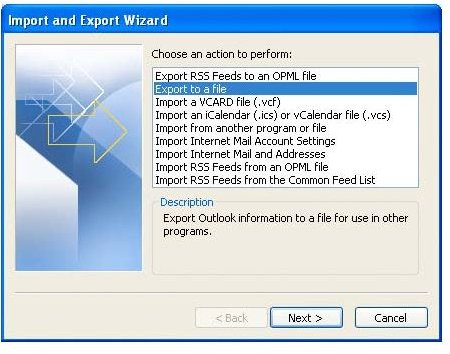
If you want to export your Outlook 2007 address book from one computer in order to import it onto another or into Windows Mail, begin by opening Outlook. Go to the File menu and select Import and Export. The Import and Export Wizard will open. Select Export to a File and click Next.
Choose the Comma Separated Values (Windows) option and click Next again. Select Contacts in the Select Folder to Export from list and click Next. Click the Browse button and choose a location in which to save the exported address book. If you will be copying it to a disk or thumb drive, saving it to the desktop will make it easy to locate and move. Enter a name for the file. Click Save, click Next and click Finish.
Import into Outlook 2007
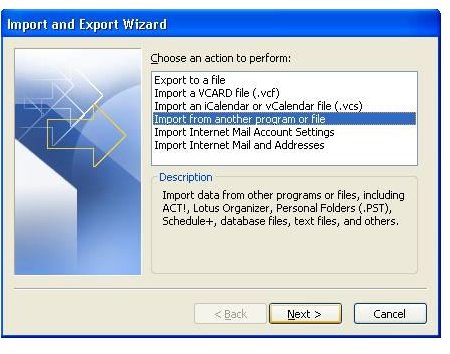
Once you have exported the file and saved it to a form of removable media, you can begin importing address book from Outlook 2007. Open Outlook, go to the “File” menu and select Import and Export. The Import and Export Wizard will open. Select Import from Another Program or File and click Next.
Choose the Comma Separated Values (Windows) option and click Next again. Click the Browse button and locate the *.csv file into which you exported your Outlook address book. Select it and click Open. Choose whether you want duplicates allowed, replaced or ignored and click Next.
Map any custom fields if necessary, click OK and then click Finish.
Import into Outlook 2010
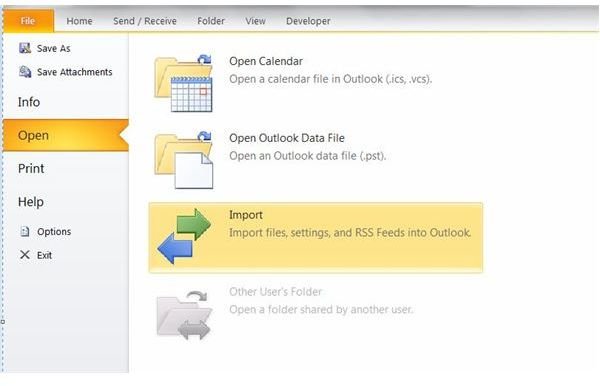
The steps for importing address book from Outlook 2007 into Outlook 2010 are only slightly different. Open Outlook 2010. Go to the File tab, click Open and click Import. The Import and Export Wizard will open. Select Import from Another Program or File and click Next.
Choose the Comma Separated Values (Windows) option and click Next again. Click the Browse button and locate the *.csv file into which you exported your Outlook address book. Select it and click Open. Choose whether you want duplicates allowed, replaced or ignored and click Next.
Map any custom fields if necessary, click OK and then click Finish.
Import into Windows Mail
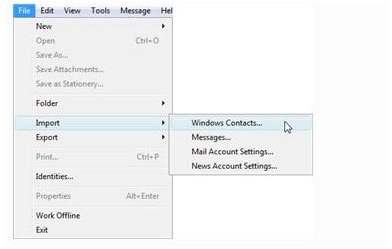
If you are using Windows Mail on Vista or XP, these are the steps for importing address book from Outlook 2007. Open Windows Mail. Go to the File menu, point to Import and select Windows Contacts. Select CSV (Comma Separated Values) and click Import.
Click the Browse button and locate the *.csv file into which you exported your Outlook address book. Select it and click Open. Click Next, choose the fields you want to import and click Finish.
Related Articles
There are many other applications with which you can share Outlook files. For more information, read Transfer Your Emails from Thunderbird to Outlook , Importing from Incredimail to Microsoft Outlook 2007 and How Do I Import My Outlook Address Book To My Blackberry Smartphone?


