Microsoft Windows has no strong tradition in handling audio. As a consequence, a whole range of audio utilities have been developed to address a range of functions not covered within Windows. This article reviews a number of applications which provide a range of audio management facilities.
Audio Functions Within Windows: Windows Media Player
Windows provides Windows Media Player which acts as a music player and has very limited functionality: it facilitates playing audio tracks, ripping of CDs and burning of audio tracks to CD. Even as a music player, it has, however, been eclipsed as by iTunes on the grounds of usability and arguably a superior quality codec in AAC compared with Windows use of MP3 and Lossy Windows Media Audio (WMA).
Usability (2 out of 5)
The Windows Media Player has always suffered by comparison with its rivals notably Apple’s iTunes. It is acceptable if you use the formats prescribed for you, but much harder to make it work if you want to use alternative codecs and formats.
Functionality (1 out of 5)
Windows Media Player is very limited in its functionality compared with its competitors.
Reliability (4 out of 5)
Although it is limited in terms in what it can do, it does what it does without causing any problems.
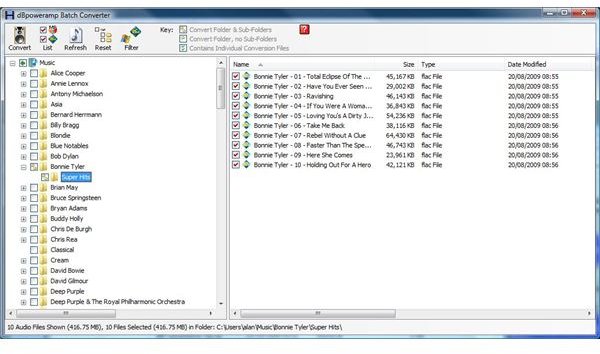
dBPoweramp Convertor
One of the major limitations of Windows Media Player and iTunes are the number of audio formats that they support. Apple has a tradition of using proprietary formats, and iTunes is no exception. Windows Media Player can handle a wider range of formats if external add-ons and codecs are uploaded.
dBPoweramp Convertor is only designed to do one thing: to convert audio files from one format to another, However, it does this very well with good reliability and performance and provides a very simple interface to do it.
Usability (4 out of 5)
dBPoweramp Convertor provides a simple interface which is easy to use.
Functionality (4 out of 5)
OK, all it does is convert audio files, but it will convert almost anything to anything else!
Reliability (5 out of 5)
I have used it extensively without any problems.
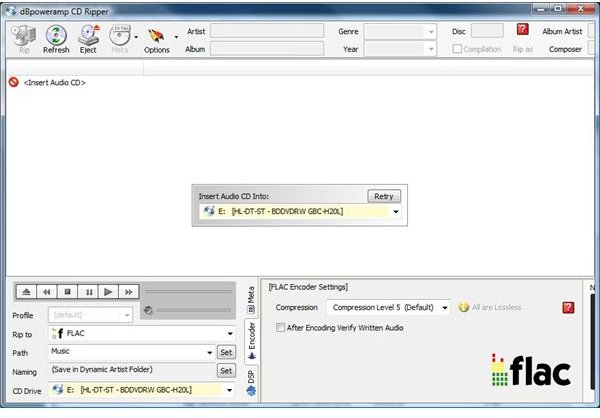
dBPoweramp CD Ripper
dBPoweramp Convertor is complemented by dBPoweramp CD Ripper to rip audio tracks from your CD collection. Its unique selling point is its integration of Accurip technology to check that the ripped copy provides an accurate copy of the original. This is combined with good performance with ripping at high speed, up to 24 x real time and a simple interface.
Usability (5 out of 5)
It works simply to achieve its tasks.
Functionality (4 out of 5)
It does what it says on the tin: but the addition of AccuRip technology provides additional re-assurance.
Reliability (5 out of 5)
It has reliably ripped over 300 of my CDs without any problems.
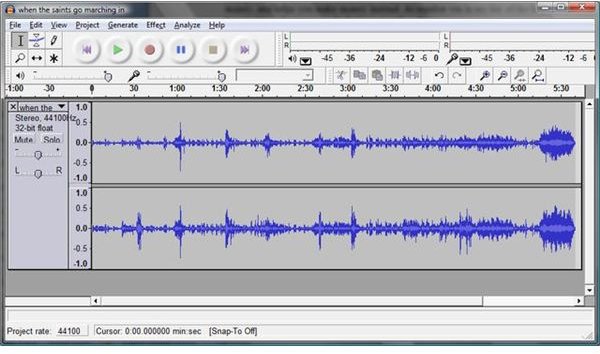
Audacity
Audacity is a freeware audio editor. It offers a remarkably wide range of facilities including splitting and joining tracks, spectrum analysis and adding effects including fadeouts. It has an intuitive graphical interface: overall usability is marred by the limited integration of the MP3 codec, which is a consequence of the licensing of the MP3 codec. There is also limited explanation of some of its more complex facilities.
Usability (4 out of 5)
I love the graphical interface but MP3 integration is clunky.
Functionality (5 out of 5)
There is a wide variety of functions here, only limted by the user’s ability to use them, and some limitations in the supporting documentation
Reliability (5 out of 5)
I have used Audacity for over 3 years and not experienced any problems.
Conclusions
The Windows operating system has never been strong in the area of audio facilities. The utilities highlighted are in my view best of breed, they are all available free of charge, and together with a music player such as iTunes or Songbird , provide a comprehensive suite of audio management facilities.


