It isn’t always necessary to buy the latest and greatest computer, or software. There can be plenty of life left in an older machine. Lots can be done to speed up a slow one too. Learn how here.
Erasing everything but Windows XP sounds much easier than it actually is. Windows by its very nature has hooks into every other program on a computer, and sometimes can’t even function properly itself without them. It has a lot of dependencies and not everything it needs is included in the Windows folder.
Let’s explore a couple of scenarios and figure out the best method of dealing with it.
Say you want to sell an old laptop on Ebay but don’t want the buyer to be able to dig out all your old data. In that case, the very best thing to do would be to format the drive and re-install Windows XP.
A full format then re-install is currently the most foolproof way of completely erasing your old data. Even then it is still possible to recover deleted data if it hasn’t been overwritten. As an added precaution I would suggest using a program called DP Shredder, which uses a Department of Defense approved algorithm that overwrites each character on the hard drive 49 times, This makes it just about impossible to recover any data from the drive.
The only problem is if you don’t have the original Windows disc. Now you either have to borrow one and use your license key, usually on a sticker on the laptop somewhere, or download a Linux distribution and put that on there. Laptops don’t seem to sell as well with no operating system installed, but by installing Linux you can sell the laptop fully working, fully legal and without any worries. Use a popular distribution like Ubuntu to increase your chances of a sale.
We have all heard the horror stories of companies or even government organizations selling off old hardware, only for sensitive information to be found on them later. Following these tips will prevent that happening to you.
New Life
Another scenario is if you wanted to remove all the old programs and registry entries in order to revitalize an older machine .
Again, the best thing to do is to format the drive and re-install Windows XP from scratch. This clears out all the mess and leaves you with a nice, tidy system that will do what you ask of it. If you don’t have the disc or don’t want to format, do the following.
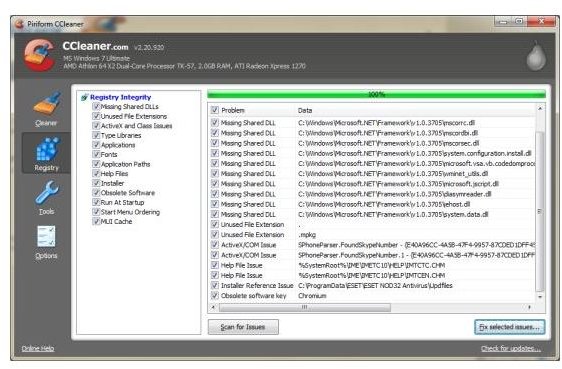
This method is slightly more straightforward and uses a tool I seem to mention a lot in my writing, CCleaner. Install this free program and use its uninstall utility to remove all programs except the ones you want to keep. Once removed, open up the registry cleaner, and clean out all the old or broken entries. Repeat this until there are no more entries appearing when you analyze your system.
Rebooting should now be much quicker and overall operation should be much more responsive. This is about as close as you can get to removing everything but Windows XP off your hard drive while still leaving it in working condition.


