Scanned documents are basically image files, no matter what they contain – text or pictures. To proceed with editing a scanned document, you need an image editor or some software with OCR capability to recognize text characters. Let us take a look at the different possibilities.
Format of Scanned Documents – An Introduction
When you scan a document, you see a light moving from one end of the document to the other end. As the light moves, it collects information about the document and converts it into an image format.
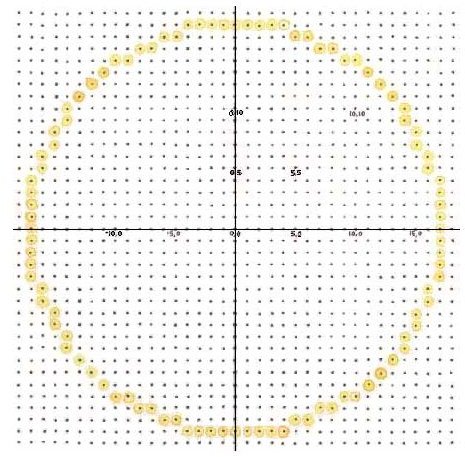
The image format contains several lines – horizontal and vertical – creating a number of squares. Each square is called a dot or point. Your scanner studies the document from the left-most part and stores document information in pixel (point) format. This format contains the number of pixel in X,Y plane and color (in RGB format) of the portion of document. An example format can be 0,0, 12, 20, 49. Here, the first two numbers refer to the pixel position – X = 0 and Y = 0, meaning topmost dot. If the number of X increases, the information would be pertaining to the next line. Increase in Y is increase in horizontal position of the document. The remaining three numbers refer to the code of colors – Red, Green, and Blue. Most of the scanners and digital displays (including cameras and camcorders) use these color combination to produce millions of colors.
The image here shows a circle stored as an image, where the dots symbolize pixels or points that the scanner creates to store the document information.
Whatever document you store, be it text, image, or a combination of both, it is always converted to a graphic format where you need an image editing software to edit it.
How to Edit Scanned Documents – Using Image Editors and OCRs
By default, when you right click on the scanned document and click Edit, you will see that a MS PAINT window opens up with the document in view. MS PAINT has plenty of features whereby you can crop, erase, change colors, and even add some text to the document. The quality of editing is limited when you use MS PAINT. It depends on how carefully you handle the tools available.
If you want to edit the document in a way that nobody can guess that it has been tampered or edited, you need good image editing skills and expertise over software such as the Adobe Photoshop . The software has many uses in the field of image processing – from creating greeting cards to restoring photographs and much more. One may add text to it in a fashion where the recipient may not even know that the text was added separately.
If you have scanned text, then the best bet to edit a scanned document is to go for Adlib’s “ExpressRecognition Server.” The software contains an OCR (Optical Character Recognition) facility that saves you trouble of using an image editor to change or add text. It passed all three tests I ran on image files containing text. You will face some problems where the formatting will not be same and some characters may be replaced with special characters. Still, it saves you a lot of time. You may download a free trial of the software from the Adlib website.
Other than Adlib, there are plenty more OCR software providers on the Internet (check out CNET and freedownloadcenter) claiming to help you edit a scanned document with Windows XP, where the document is mostly text.
IMPORTANT: Use your antimalware to check for spyware and other malware (even if the website claims it to be clean) before you install any software that helps you with how to edit scanned documents in Windows XP.


