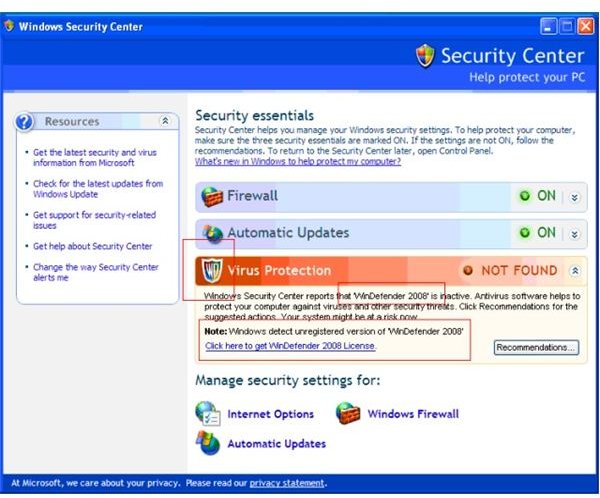
A new spyware application that mimics Windows Security Center could be harming your computer.
A Windows Security Center Mimic
A new spyware application called WinDefender 2008 is affecting Windows users by giving a false pop-up message alerting them to a problem with their computer. A pop-up box appears, telling you that a possible spyware infection has been detected, and encourages you to upgrade to a specific anti-spyware application.
The problem is that the alert looks exactly as though it’s coming from Windows Security Center, but it isn’t. In fact, WinDefender 2008 is a hoax that has been designed to mimic Windows Security Center identically. It tricks users into downloading and purchasing the WinDefender 2008 software, which is a fake malware application designed to harm your Windows system.
There are increasingly more and more malware attacks that are being created to look like actual Windows components, with only slight, almost-imperceptible differences. Most users these days know not to click on a small “alert” pop-up message, and as a result, malware creators have had to get craftier in order to deceive people. WinDefender is just one of the newest attempts by malware to look identical to a legitimate security application.
Other Problems Caused by WinDefender
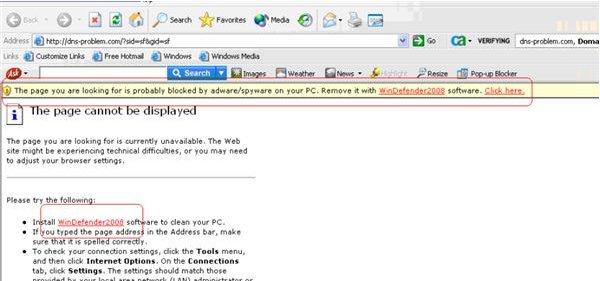
Besides the false Windows Security Center alert, WinDefender hijacks your web browser by blocking you from being able to view pages. Trying to browse to a web site returns an error stating that “the page cannot be displayed,” and telling you that the reason the page is not viewable is due to “adware/spyware on your PC.” There is even a yellow drop-down menu instructing you to go to the WinDefender page and download the software in order to repair your system.
Again, this error appears to be a legitimate security alert from Windows, so users are tricked into clicking the link and downloading the phony WinDefender application onto their computers.
Removing the WinDefender Spyware Application
If you should happen to find your computer infected with the WinDefender spyware, most anti-malware applications should be able to remove it for you. It’s always considered best practice to have a current anti-virus, anti-malware application on your computer. However, if you need additional help removing WinDefender from your computer, you can go to Microsoft’s web site to download and run the Malicious Software Removal Tool for free.
Source: Computer Associates, CA Security Advisor Research Blog


