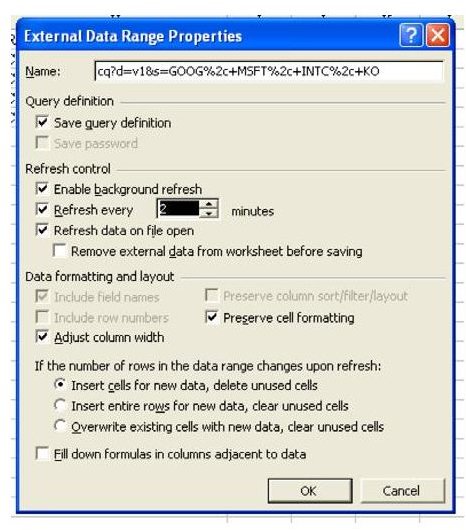
Problem: You have a Web query inserted in your spreadsheet that updates automatically when you open the spreadsheet. You would like the Web information to update automatically every two minutes.
Strategy:
-
Select a cell in the Web Query table. From the menu, select Data – Import External Data – Data Range Properties.
-
From the External Range Properties dialog box, in the Refresh Contol section, select the Refresh Every option. Change the spin button to 2 minutes, as shown in Fig. 1031.
Advertisement
**
Gotcha:
A refresh cannot happen if you are in Edit mode. If you start to enter a cell in the worksheet, get a telephone call, and head off to a meeting without completing the cell, Excel cannot update the query.
Gotcha:
You may want to open a second instance of Excel and have the AutoRefresh query retrieved above in its own window. If you are trying to work in the same instance of Excel, the pause that occurs every two minutes while Excel refreshes is maddening.
Summary:
To have a web query automatically update periodically, use the properties box and select the AutoRefresh button.
Commands Discussed:
Date – Get External Data – Data Range Properties
**


