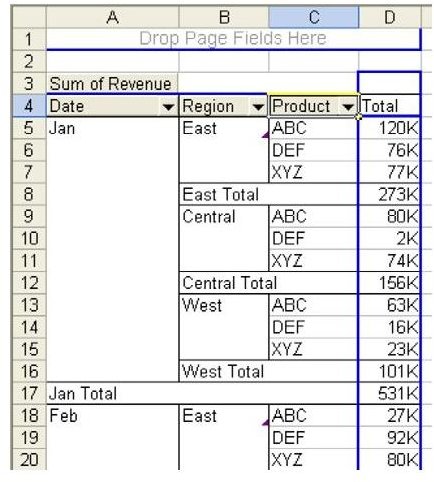
Problem: Pivot tables are sometimes used just as an intermediate step in order to reach another result. If you are going to be copying the data to a new workbook that will be used as a new dataset, then all of the totals by month, region, and year will tend to get in the way, as shown in Fig. 959.
Strategy: You can turn off subtotals for any field.
-
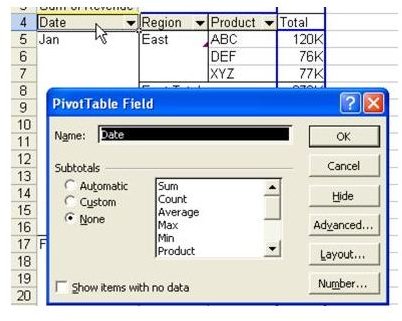
Double-click the Date field. Change the Subtotals setting from Automatic to None, as shown in Fig. 960.
Advertisement -
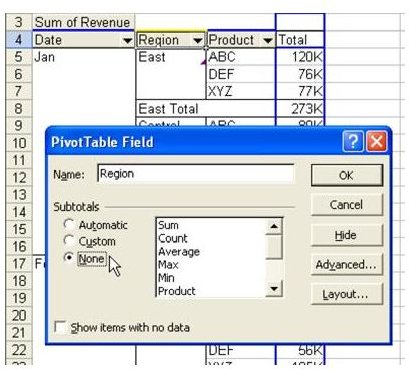
Double-click the Region field. Change the Subtotals from Automatic to None, as shown in Fig. 961.
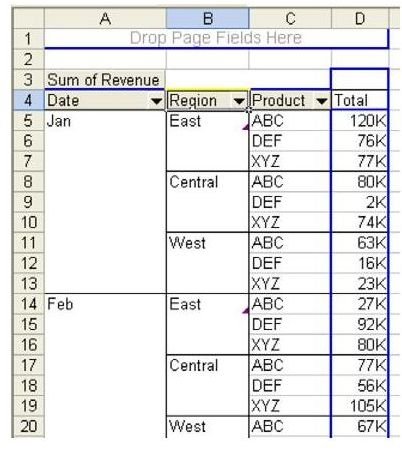
Result: As shown in Fig. 962, every row in the pivot table is now a data point. If you copy and paste this table to a new workbook, you will not have to manually delete all the total rows.
Summary: When you have more than one Row field, you can remove the automatic subtotals on the outer fields in order to produce a cleaner looking report.
Commands Discussed: Data – PivotTables – Subtotals
Images