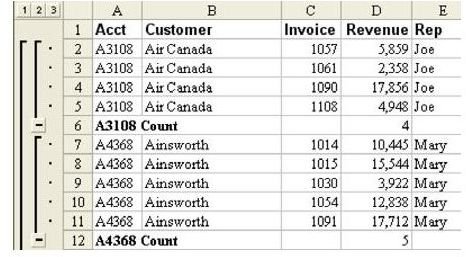
Problem: You added automatic subtotals to this dataset. As shown in Fig. 685, the subtotals of four for Air Canada and five for Ainsworth are clearly not correct. What went wrong?
Strategy: The first time that you subtotal a dataset, Excel assumes that you want to subtotal the final column in the dataset. If this column contains text data, then the subtotals dialog will default to a Count instead of a Sum, as shown in Fig. 686.
Gotcha: This problem will also happen even if your final column contains mostly numbers but includes one blank cell.
Summary: Excel’s Intellisense often gives you the correct choices, so you may get lulled into the habit of rarely paying attention to the Use Function field in the Subtotals dialog. When you see Counts instead of Sums, you will know how to correct it.
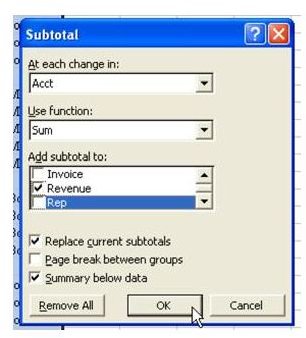
Commands Discussed: Subtotals To correct the problem once it appears, open the Subtotals dialog again. As shown in Fig. 687, change the Use Function dropdown from Count to Sum. Choose OK. To avoid the problem in the first place, remember to double-check the Use Function field in the Subtotals dialog, particularly if your data has text in the rightmost column.
Images
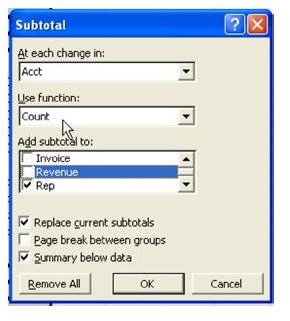
The first time that you subtotal a dataset, Excel assumes that you want to subtotal the final column in the dataset. If this column contains text data, then the subtotals dialog will default to a Count instead of a Sum, as shown in Fig. 686.
Gotcha: This problem will also happen even if your final column contains mostly numbers but includes one blank cell.
Summary: Excel’s Intellisense often gives you the correct choices, so you may get lulled into the habit of rarely paying attention to the Use Function field in the Subtotals dialog. When you see Counts instead of Sums, you will know how to correct it.
Commands Discussed: Subtotals
To correct the problem once it appears, open the Subtotals dialog again. As shown in Fig. 687, change the Use Function dropdown from Count to Sum. Choose OK.
To avoid the problem in the first place, remember to double-check the Use Function field in the Subtotals dialog, particularly if your data has text in the rightmost column.


