If you have been looking for a way to sync Outlook Web Access to Outlook on your computer, then unfortunately you’re in for disappointing news. Find out why this isn’t possible, and what alternatives you should consider.
Outlook Web Access: Corporate E-mail in Your Browser!
The popularity of Outlook Web Access as an interface for accessing corporate e-mail accounts remotely has seen Microsoft issue successively improved versions, allowing you to create new e-mails, calendar, contacts and tasks and edit them just as you would on a desktop installation of Microsoft Outlook.
Ideal for use on a laptop while away from the office (which might be much easier to use than Outlook on a Windows Phone, for instance), Outlook Web Access can be run on any computer that has a suitable web browser installed.
Beyond archiving e-mails to the computer concerned, however, there is no way to copy e-mails from Outlook Web Access.
What’s the Problem?
Why can’t I sync Outlook Web Access to Outlook on my computer?
Microsoft Outlook Web Access works by providing a web-based front end to your Microsoft Exchange e-mail account. Effectively, for the time you are accessing OWA, the browser is acting almost exclusively as a copy of Outlook Web Access.
This isn’t to say that you cannot use the browser for other purposes, but while you’re visiting your OWA page you will notice that almost all functions that can be found in Outlook can be accessed in Outlook Web Access.
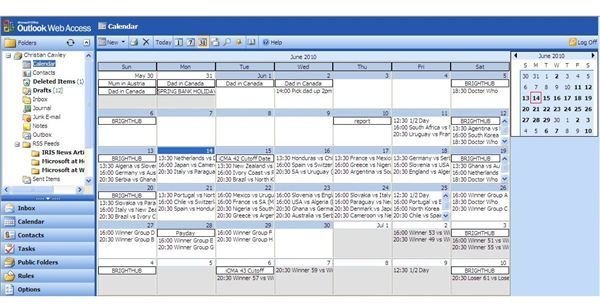
However, this doesn’t represent synchronization. Instead, it simply means that if you login to Outlook Web Access from the same computer that you would normally access your e-mails via the normal, desktop Outlook, you will see that any changes you make are almost immediately replicated.
Screenshot by author.
Two Interfaces for Different Purposes
Outlook Web Access is mainly designed to allow access to corporate e-mail accounts from a remote location, such as a cyber café or from home. Rather than bother with the trouble of configuring every Outlook installation on corporate laptops to access the mail server remotely, IT departments can promote the use of OWA, encouraging users to visit a single web address (usually with a useful alias such as www.mycompany.com/emails ) so that e-mails, calendar items, tasks and contacts can be read, viewed and amended.
Meanwhile, the traditional Microsoft Outlook desktop interface that often comes as part of Microsoft Office is designed to be used within an organization; it offers various benefits such as integration with other applications and services that might be available. Unlike Outlook Web Access which relies on the mail server and a web server for processing data and delivering content, the computer running the full Outlook application performs the majority of the processing.
Using the Right Tools for the Job
As both Outlook Web Access and Outlook are retrieving e-mails, calendar and contact data from the same source, synchronization between the two applications happens automatically, and as long as you are accessing the same e-mail account from each, you should notice this.
Note, however, that syncing data between these two systems might not occur immediately. For instance OWA might be configured to only update every 15 minutes or so in order to reduce web server load and bandwidth used.
If you are looking for some way in which you can copy data from Outlook Web Access to a local installation of Outlook that isn’t associated with the same e-mail account, you will need to investigate the possibilities of archiving e-mails from OWA .
References
Author’s own experience.
Screenshot by the author.


