If you use Microsoft Outlook there is no need to head to the web every time you want to access your Hotmail account. Now you can view Hotmail accounts with the latest version of the popular email client!
Access Hotmail via Microsoft Outlook
Thanks to the Outlook Connector component of Windows Live, it is now possible to enjoy perfect synchronization between Microsoft Outlook and your Windows Live Hotmail email account, allowing you to enjoy push email and shared calendar and contacts.
However this does require a little configuration – while the majority of options will be enabled by the connector tool, you might like to change a few of the defaults to something a little more suitable for your requirements.
Hotmail Outlook settings are easy to configure, thereby allowing you to spend more of your valuable time enjoying Windows Live email in Outlook and as little time as possible making sure it works.
Make Sure You’re Connected…
Before proceeding with any of the steps here, you need to make sure that you are using the most up-to-date version of Outlook Connector.
Microsoft have released various versions of this over the past few years, originally for Outlook 2007 and Windows XP, Vista and Windows 7, and again for Outlook 2010 beta.
However the only way to reliably use the connectivity between Hotmail and Outlook that Microsoft is to use the new Outlook Connector tool which you will be prompted to install when attempting to setup a Hotmail email account in Outlook.
The article Using Outlook Social Connector gives full details on how you can do this.
Managing Your Hotmail Outlook Settings
Various configuration settings can be applied to a Hotmail account in Microsoft Outlook. For instance, you might wish to setup rules and alerts, or modify your account settings.
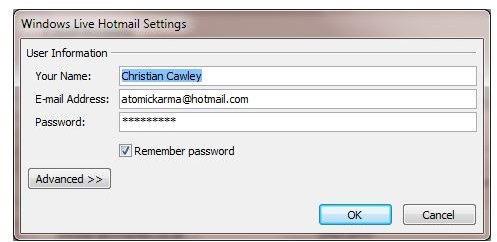
In order to do this, go to File > Account Settings and select your Hotmail account from the list before clicking Change…. This is useful if you have changed your password (something you can only do via the Windows Live Hotmail website) or if you want to change the way the email account is labelled in Outlook.
Similarly if you wish to setup rules and alerts, go to File > Manage Rules and Alerts, where you will be able to change the way Outlook treats messages from specified senders.
Pros and Cons of Using Hotmail in Outlook
With a Hotmail account setup in Outlook, you will no longer need to open a web browser to access your Windows Live Hotmail account. This has various advantages and disadvantages.
For instance while the email side of things is completely handled by Microsoft Outlook, the administration can only be handled via the Windows Live website. As such if you want to change your password or personal details you must visit www.live.com and login.
Similarly all of the extras you get with Windows Live are restricted to the website with the exception of the calendar and contacts. There is no access to your SkyDrive from Outlook, for instance, although there is no reason why this should not change at some point in the future…
References
All screenshots and references from Microsoft Outlook


