Here’s all what you want to know about Jetico BestCrypt for Windows file and folder encryption including BCArchive encrypted archives. This article additionally contains useful information about the BestCrypt add-on BestCrypt Volume encryption, the BestCrypt Traveler freeware, and much more.
System Requirements (5 out of 5)
BestCrypt , as stated in the help file, requires approximately 10 MB of free hard disk space, and 486 CPU or higher; the software has no specific RAM requirements but probably performs the better the more available RAM your computer has.
Jetico’s BestCrypt website lists the following operating systems as Microsoft system requirements: Windows 7, Vista, XP, …, as well as Windows Server 2003 - 2008; a separate release of BestCrypt is available for Linux systems.
Installation (2 out of 5)
The BestCrypt install follows standard procedures including welcome screen, license agreement, installation location, program folder selection until you arrive at the Best Crypt Add-ons selection, which is a mix of install options and Jetico tools not included in BestCrypt.
Included in your license of the software are BestCrypt [1] and encrypted archives [2], so you may want to tick that option. BestCrypt Volume encryption [3] can be included depending on the license you have or you might purchase.
Technically, these two add-ons are well explained by the install wizard shown in the images below. Please see section price to value of this review for additional information.
The other two Best Crypt add-ons, Swap file encryption and Wipe utilities, make up Jetico’s BCWipe utility you can find discussed in Bright Hub’s review BCWipe Military-Grade Secure File Deletion . BCWipe must be licensed separately.
Before you can use the software you have to restart your computer.
[inlineImage|sectionimages|8FE364FDE9ABBC24E28A8DB1A204E0D1B35EF6E8|[1] |][inlineImage|sectionimages|0C4A56D2C072C2D9936D8CB4B1E2F0A0D0E3DA68|[2] |][inlineImage|sectionimages|7B49BFC0C49E43043CF90679B48A7DFAADCBABF0|[3]|]
Interface (4 out of 5)
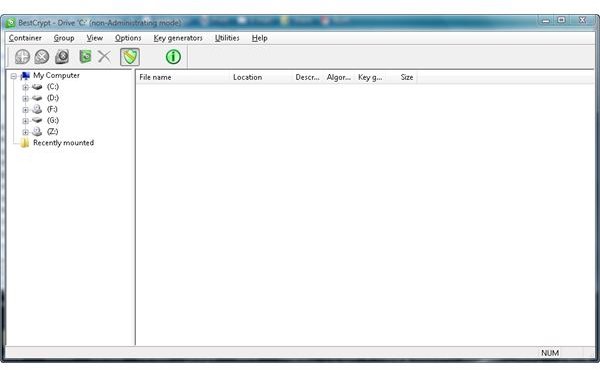
Best Crypt’s GUI is standard type interface without surprises, but I didn’t find Best Crypt’s GUI very intuitive either. Please note that on computers running Windows Vista you have to invoke Best Crypt’s Control Panel by right-clicking the program and selecting Run as administrator.
Features (4 out of 5)
BestCrypt secures data (folders and files) by means of encrypting and placing file objects in special containers called virtual drives. The software supports standard encryption algorithms such as AES (Rijndael) 256-bit key for example. BestCrypt’s integrated Container Guard utility protects your encrypted container from Windows so that they cannot be removed or accidentally deleted.
BCArchive, included in BestCrypt but also available as freeware, can be used to compress and encrypt archives. BCArchive’s self-extracting file options eliminates the need for BestCrypt on the recipient’s computers where the archive can be opened with the same password it had been secured (symmetric cryptography).
BestCrypt Traveler is a freeware utility you can download from Jetico. It does neither require installation nor licensing and is very useful for unlocking any kind of BestCrypt encrypted data (containers) on USB drives for example.
In stark contrast to Windows 7’s BitLocker To Go, discussed in Bright Hub’ article BitLocker To Go - Setup & Tips for Windows 7 USB Drive Encryption , does BestCrypt Traveler permit creating new encrypted containers using the (strong) AES algorithm. This feature essentially eliminates buying data encryption software in some cases.
BestCrypt cannot be used to encrypt entire partitions or volumes unless you have the BestCrypt Volume encryption option licensed or installed. If you are looking for drive encryption including the Windows start partition also opt for BestCrypt Volume, which can be tried free.
Performance (4 out of 5)
The software has been installed and tested on Windows Vista where it performed well and as intended. The creation of a 10 GB container took BestCrypt a couple of minutes. After formatting and mounting the virtual drive files and folders placed in the encrypted container were encrypted on the fly.
Help & Support (5 out of 5)
BestCrypt comes with an excellent manual. More information including FAQs, a forum as well as a tips & tricks section can be found on vendor’s web site along with email details and a form for getting in contact with BestCrypt support.
Price to Value (3 out of 5)
BestCrypt for Windows is available for $/€ 59.95. The version which includes drive encryption carries a price tag of $/€ 119.95 and is called BestCrypt Volume Encryption. If you intended to buy BestCrypt check out Price to Value of this article for more information about the vendor’s Euro / Dollar parity, or read the vendors shopping cart terms carefully.
The Bottom Line
BestCrypt for Windows and BestCrypt Volume Encryption are commercial solutions for what Microsoft has partially integrated in their latest flagship Windows operating systems Windows 7 and Windows Vista; Windows folder encryption is even older. On the other hand, as shown, does BestCrypt have some benefits over native Windows utilities.
If you are a bit familiar with encryption, and if official vendor support is not a criteria, you may also want to consider Open Source software such as TrueCrypt encryption for example.
References
- Screenshots by the writer
- Author’s own experience


