Mamutu is a piece of antimalware software which offers behavior based malware blocking. In this review I am going to explain what Mamutu does, and where the software could perhaps be improved. Find here all you want to know about Mamutu’s IDS real-time protection guard.
What is Mamutu?
Mamutu offers real-time protection based on behavior based malware blocking (heuristics). The vendor claims protection and reporting for the following pieces of software:
* Backdoor related behavior
* Spyware related behavior
* HiJacker related behavior
* Worm related behavior
* Dialer related behavior
* Keylogger related behavior
* Trojan Downloader related behavior
* Injection of code into other programs
* Manipulation of programs (patching)
* Invisible installations of software
* Invisible Rootkit processes
* Installation of services and drivers
* Creation of Autostart entries
* Manipulation of the Hosts file
* Changes of the browser settings
* Installation of debuggers on the system
* Simulated mouse and keyboard activity
* Full quote from https://www.mamutu.com/en/software/mamutu/
System Requirements (3 out of 5)
I have not been able to find out about system requirements in a reasonable amount of time (deduction of two points!). In contrast, it is relatively easy to find out what Mamutu stands for, but I will not bother you with that.
In any case, I have positively tested Mamutu on a 32-bit version of Windows XP. The downloadable executable is very small, approximately 3 MB. After running the update Mamutu occupies roughly 6 MB of hard disk capacity.
Please make use of the trial version if you find Mamutu appealing after reading this article.
Installation (3 out of 5)
Mamutu can be installed in a variety of languages including English. The setup wizard includes an EULA and lets you view or change the install path, Start menu folder as well as configuring Desktop and Quick Launch icons.
To run or update the software you have to have or create an account. I have tried to open an account from within the GUI but received a “general processing error”. However, I was finally able to register by means of the “Forgot Password” functionality which, after going to the vendor’s Web site, sent me the credentials with which I have been able to access my account obtain a trial version license key.
The setup then went on with upgrading the software which then led over to configure Mamutu protection. I didn’t change any defaults and the setup then finished smoothly. A restart of the computer was not required.
Interface (5 out of 5)
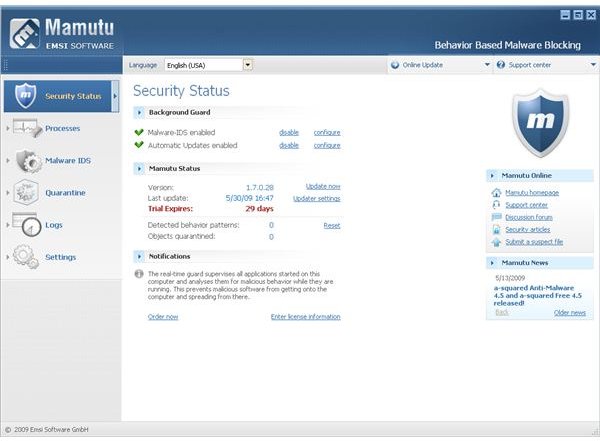
The Mamutu GUI is light, cool, and logically organized. The left pane shows your computer’s security status, Processes, Malware IDS, Quarantine, Logs and Settings which can be viewed and configured in the details pane.
Features (3 out of 5)
Mamutu is a home computer IDS for which you can configure application rules, malware rules as well as alerting. The Mamutu Security Status gives you an overview of your system’s current protection and detected items of malicious software. You can enable the Malware IDS and configure automatic updates there. A process monitor similar to Windows Task Manager lets you create rules based on the running processes, or you can simply kill or quarantine a process.
The Mamutu real-time guard lets you install additional languages besides English, and you can opt-in or out of the Mamutu anti-malware community network, view and change notification items etc. Under Settings, Permissions you can secure Mamutu so that Domain users cannot fiddle with the configuration or stop the Mamutu IDS for example.
Mamutu applies behavior based malware blocking to your computer which certainly is the right way to protect against emerging threats. Yet, the absence of malware signature file is about as risky as running an anti-malware program without heuristics. In essence, optimal real-time protection combines behavior based malware detection with a signature database, which is largely missing in Mamutu.
Performance (4 out of 5)
The Mamutu IDS has a very low impact on system performance. I deduct one point because of its limitations, that is the absence of malware signatures files and anti-virus functionality.
Help and Support (3 out of 5)
Mamutu has a GUI integrated help, yet clicking the help drop-down menu reveals direct links to the Mamutu homepage, discussions forum and support center which offer more information. The information is scattered among the vendor’s products, and you can access support center and open a trouble ticket only if you log-in.
Price to Value (3 out of 5)
Mamutu carries a price tag of $29.95 for a single PC one year license; volume discount prices are available. As the Mamutu software does not have a scanning feature you to need to buy a license for a complementary product which makes the product expensive compared to, for instance, Webroot AntiVirus with AntiSpyware , which sells for $39.95, and includes a malware signature database,too. Additionally, many other solutions, such as ESET Smart Secrity , include a behavioural-based or heuristic scanner which makes Mamutu’s pricing seem even more steep.
Besides the costs, opting for a single piece of software which can do all reduces potential software conflicts and is easier to configure and to maintain.
The Bottom Line
If you already have a-squared , then Mamutu may be the right solution as it marketed by the same vendor. Otherwise, although Mamutu is a pretty good product, its pricing puts it outside of the top choices.
References
- Mamutu official product page
- Author’s experience
- Screenshots by the writer


