What is Skypenames2.exe? Is it a virus, a fault or just a poorly named Skype component designed to let you click telephone numbers in web pages? I’ll cover this question and explain how to take care of Skypenames2.exe quickly and easily.
What Is Skypenames2.exe?
If you regularly use Skype, you might have come across the Skypenames2.exe warning.
This is a frustrating example of supposedly integrated software components not working as intended, and while there is no security issue with the warning, it is pretty annoying.
The message displayed by Skype usually reads along the lines of:
Skypenames2.exe wants to use Skype
…with an option to either Allow Access or Deny Access. While this is a straightforward choice, it isn’t clear from the message whether the oddly-named Skypenames2.exe is a genuine, Skype-approved program or a cleverly named piece of malware designed to confuse the user.
Skypenames2.exe is Not a Virus
Let’s get this out of the way as quickly as possible. Skypenames2.exe is not a virus. It isn’t even malicious, it is just very poorly named.
If it isn’t a virus, what is Skypenames2.exe for?
If you’re using Internet Explorer, Mozilla Firefox or any other compatible browser, you may well have a Skype plugin which allows you to view telephone numbers on your browser in a format that allows you to click on them and call the highlighted number through Skype.
Skypenames2.exe facilitates the link between your browser plugin and the main Skype app, allowing this integration to occur.
Can I Disable/Uninstall Skypenames2.exe?
If you opt to Deny Access to Skypenames2.exe, then you can simply carry on as if nothing happened.
However, if you granted access and now wish to undo this process, you should follow these steps:
First, open your web browser (the same steps are appropriate for Internet Explorer and Mozilla Firefox).
Second, find the Skype add-on icon on the browser toolbar and click it to enable or disable phone number highlighting. On the subsequent screen, you can opt to turn name and phone number highlighting on or off.
You can check whether this has worked by loading up a page with telephone numbers, perhaps the “contact us” page of your favourite website.
Reinstall Skype
In cases where the Skype plugin/add-on icon isn’t visible, you should uninstall Skype and reinstall it.
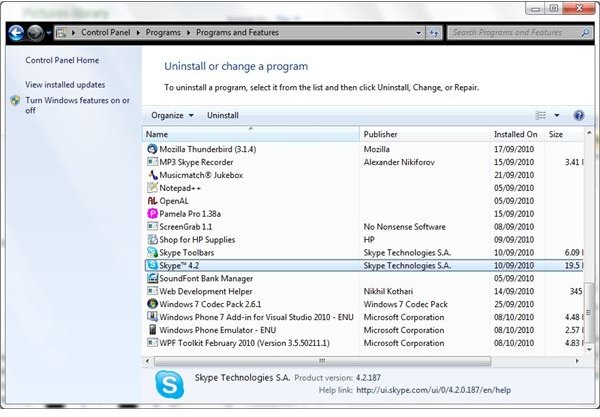
To uninstall, go to Start > Settings > Control Panel > Programs > Programs and Features > Uninstall a program (or Start > Settings > Control Panel > Add or Remove Programs in XP) and find Skype in the list. Select the entry and Uninstall the application.
To reinstall Skype, visit the Skype download page at www.skype.com/go/download . During the installation process, look for the Options button. In this stage of the installation, clear the check boxes for the entries Install Skype extension for Mozilla Firefox and Install Skype add-on for Internet Explorer. This will ensure that the plugins are not installed and prevent the Skypenames2.exe message.


