Barely a month goes by without news of yet more user data being hacked from companies that should know better. If you suspect your details might have been stolen, or are simply concerned about online security in general, regularly updating your Windows Live password is a step in the right direction.
Retaining control over your various online accounts is vital in this age of cybercrimes, and as such it is important that you regularly update your passwords on a semi-regular basis (for instance every three to four weeks) to prevent any unauthorized use.
During 2011, several high profile companies have had their customer accounts hacked, which could mean that your details are out there, sat on a database owned by an online fraudster who is patiently working his or her way through a list of usernames. Any other information that they have on you from the data that was hacked (date of birth, for instance, and address) could help them to uncover your password through profiling methods, so it is best to be aware of this and keep your password up to date rather than wait for something to happen.
For MSN or Windows Live users, changing a member password is pretty simple, although to be aware that updating this password might impact other Windows Live services that you use.
Changing Your MSN/Windows Live Password
To update your MSN password, you will need to first login via login.live.com . Windows Live is the new over-arching title for what used to be known as MSN, encompassing Messenger, Hotmail and new services such as Xbox Live, Zune and these accounts are even used for accessing a Windows Phone.
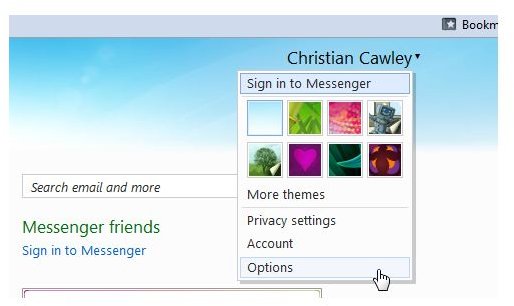
After logging into your Windows Live account, you will notice a small menu in the upper-right corner, similar to the one pictured here. Hover your mouse over the down-pointing triangle for the menu to open, and then select Options > Account > Password to begin the process.
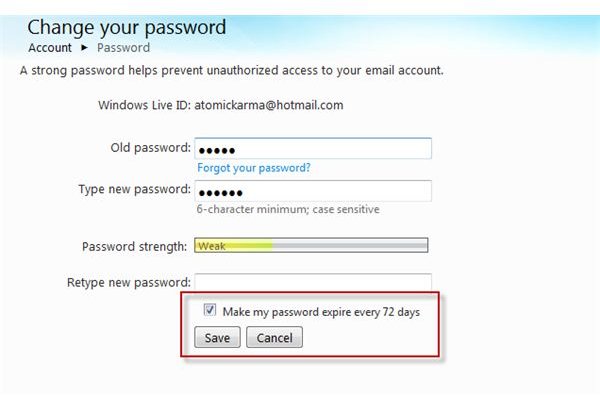
Here, you will be asked to input your existing account password before entering the new password twice – this is done in case you make an error and end up with an account you can’t access. Either way, type carefully.
Once you’re done, you can simply tap Save – but is your password secure enough?
How to Make Your Password Secure
Updating your current password is easily done – the problem is in making it secure.
You will notice that a small meter will display the complexity of your password; the longer and more random the password, the more secure. But how do you make a secure password?
There are various ways of doing this. You might utilize a web-based password generation tool such as that found at https://strongpasswordgenerator.com/ - but these tools have a slight disadvantage – the passwords are pretty tough to remember.
While the passwords from Strong Password Generator are accompanied by a useful hint system:
Your new password:
5Y372T2T1T9FHjs
Remember your new password as:
5 YANKEE 3 7 2 TANGO 2 TANGO 1 TANGO 9 FOXTROT HOTEL juliet sierra
…they’re still pretty tough.
Remembering the password and changing it regularly is more important than forgetting the password – you need to be accessing your account at least semi-regularly to ensure that no one else has gained access to it.
The best thing to do is find a happy medium. Strong Password Generator will allow you to alter the length of the password, so you might keep it shorter, or perhaps add a favorite word or song-title onto the end of a small random string.
Choosing a password is tricky. While a browser-based password manager might remember it for you, this might not be wholly useful with a system such as Windows Live, where many different services are accessed with the same password.
Do You Use Other Services?
Changing your MSN or Windows Live password is a great way to keep your account secure – but it could cause problems with other services.
For instance, if you have an Xbox 360 and use the Xbox Live service then you may find yourself running into problems next time you attempt to sign in to your account. The same might be true of the Windows for Games service, and a change to your password will also prevent access to Windows Live Messenger and other elements of the Windows Live Essentials suite.
Notably, a change to your password will also cause problems on a Windows Phone 7 device.
Don’t Just Update Windows Live
If you are truly concerned about the effect of not changing a password then you should certainly spend time updating passwords on accounts other than Windows Live. Whether you access these accounts regularly or occasionally, as long as you use the accounts and they hold information about you then you should take the time once a month to update them with new passwords.
Once last point to remember is the choice of password for these other accounts; while it might seem convenient and less fuss to use the same securely generated password for all accounts, this is potentially dangerous. Instead, you should use multiple passwords that cannot be used on similar accounts.
Most of all, stay secure!
References
- Screenshots provided by author.
- Author’s own experience.


