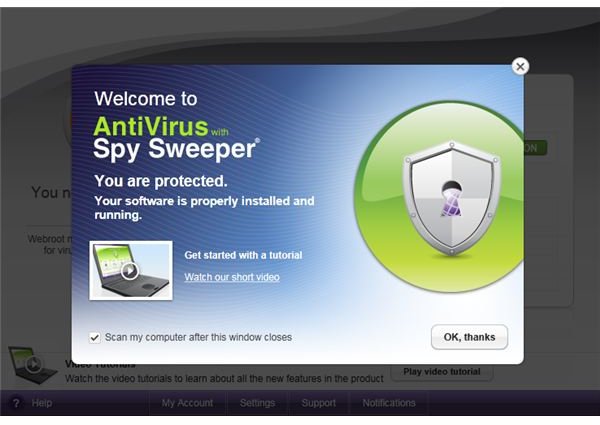
In this review of Webroot Antivirus with Spy Sweeper we discuss this excellent piece of software which is a powerful protection suite against malware, potentially unwanted software and spyware.
System Requirements (5 out of 5)
All editions of 32-bit and 64-bit Windows Vista and Windows 7 are supported. Webroot Antivirus and Spy Sweeper also runs on 32-bit Windows XP with SP2 or higher. A 1 GHz CPU for Vista and Windows 7 as well as 2 GB RAM are recommended for these operating systems. Minimum requirements for Windows XP are a 300 MHz processor and 256 MB RAM.
To install and run the software your computer is expected to have 300 MB free hard disk space and Internet Explorer 6.0 or FireFox 3.0; higher versions of these browsers work as well.
Setup (5 out of 5)
When setup starts the first thing you have to do is enter your license key. On the first screen you will also find a link to the software license agreement, as well as a tick box to opt out of WARN - Webroot Automated Research Network.
The Webroot Automated Research Network works as follows: When you visit sites on the Internet, WARN automatically collects data about new spyware and viruses and sends the information anonymously to the Webroot research team. In other words, WARN is the community of Webroot users for fighting emerging threats. It is recommended to accept the default setting of opting-in.
When you proceed by clicking Agree & Install the installer pulls the software over your Internet connection and starts the install routine. After a little while, on the next window you can expect to see that install has completed. Clicking Close leads over to the Webroot interface where you find a tutorial and initiate a scan of your computer by hitting the OK button.
In summary, the setup is straightforward and only requires a minimum of user intervention. It is recommended registering your software now to prevent the registration reminder popping up repeatedly.
Interface (5 out of 5)
The GUI of Webroot Antivirus with Spy Sweeper makes a cool impression and is easy to use. You won’t get lost deep in configuration items, yet by default not all protection items are enabled if you stick with Webroot’s recommended settings.
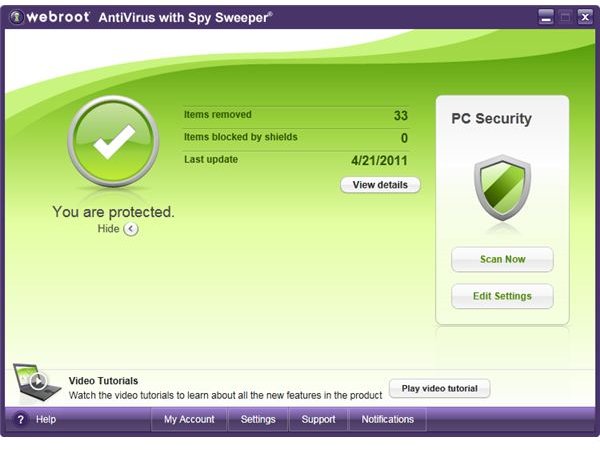
It may makes sense for you tweaking Scan, Shields and Quarantine options according to your needs by clicking Edit Settings on Home of the Webroot interface.
Features (5 out of 5)
Webroot Antivirus with Spy Sweeper protects your computer against spyware, viruses and similar threats and annoyances including rootkits, adware,Trojans and popups.
First and foremost, the antivirus and anti spyware suite blocks virus and malware infections by using award-winning technologies powered by Sophos. To protect your computer from being infected Webroot Antivirus with Spy Sweeper uses a database of known threats, called signature files, as well as behavior analysis to block new, emerging malware.
The second layer of its 360° degree protection is about virus and spyware detection should there be anything unwanted already residing on your computer. Scanning your drives applying advanced discovery methods and on-access scans detect unwanted programs at which point you will be alerted as our tests have shown.
Threat removal is the third layer of virus and spyware defense. Suspicious and malicious pieces of software encountered during sweeps or run-time scans have automatically and appropriately been dealt with on our test system.
Those who love gaming can turn on gamer mode under Settings –> Gamer Mode. Doing so will delay scans, alerts and notifications for undisturbed gaming experience so that your system performance won’t be slowed down.
What’s more is that the anti-malware suite can be set (non-default, but strongly recommended by us) to watch inbound and outbound email for infected attachments, and safeguards your online privacy by stopping programs such as keyloggers trying to sniff sensitive information without your knowledge.
Last but not least does Webroot’s VersionGuard makes sure your all components of Webroot Antivirus and Spy Sweeper Suite are always up-to-date.
Performance (5 out of 5)
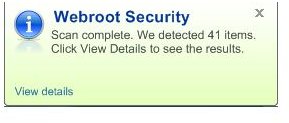
Webroot Antivirus and Spy Sweeper sucessfully found and eliminated the 41 items of malicious pieces of software we had placed on our test system!
During our tests on a Windows 7 computer with average system resources we noted no impact on computer performance and user experience. If we had not installed the Webroot Antivirus and Spy Sweeper, we wouldn’t have noticed the presence of this software since it was protecting the computer silently.
Help and Support (5 out of 5)
Webroot Antivirus with Spy Sweeper includes various channels of support which can be accessed over your Web browser or launched from the software GUI, including an extensive help menu, tutorials, Frequently Asked Questions and a ticketing system. Last but not least there is free U.S. based phone support!
Price to Value (5 out of 5)
The single PC license of Webroot Antivirus with Spy Sweeper has a price tag of $39.95 a year, but if you choose a longer subscription period or license multiple PCs costs come down to $10/year per PC.
There is not a trial version of this antivirus and spyware protection available for demo, but be assured that this is an excellent, easy-to-use, piece of software to protect you from all sorts of computer threats.
Moreover, the vendor gives buyers a no-questions-asked 30 days Money back guarantee.
The Bottom Line
Choosing Webroot Antivirus with Spy Sweeper version will give you easy to use virus and spyware protection bundled into one excellent product at affordable rates. If you want Webroot Antivirus and Spy Sweeper protection but also have need for online backup, privacy protection including an URL scanner, as well as an easy-to-use firewall then make sure to check out Webroot Internet Security Essentials .
Reference
Screenshots taken by the author
Product reference: Webroot Antivirus with Spy Sweeper version 7.0.8.7
Official vendor product page: https://www.Webroot.com/En _US/consumer-products-antivirus.html


