Does iPhoto automatically opens when you connect your digital camera to upload photos and vids? Try Image Capture instead, it has more options.
ImageCapture’s Options
ImageCapture will let you selectively upload multiple photos as well as videos. iPhotos won’t let you do this; it will let you select photos to upload but there is no video upload option. So use ImageCapture and select your best videos and photos to upload.
While iPhotos has an attractive and easy-to-use interface, image capture beats it with the video upload option along with the option to just download some rather than all of your images.
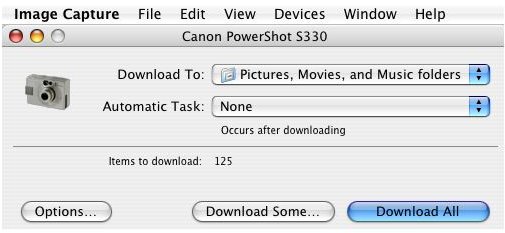
What Image Capture will do is open up a window that will allow you to pick and choose as many or as few photos and videos that you have taken to upload. You’ll want to select the “download some” instead of the “download all” button, unless of course you want to download all images and video from you digital camera and then edit afterwards.
Thumbnails of Photos & Vids
ImageCapture will read the contents of your camera’s Flash card and open an additional window giving you a thumbnail of each picture or video in either jpg or avi form. (Other cameras may have other formats.) ImageCapture is one of those nifty pieces of software located in your Applications folder that you may not know about. Since the defaults are set to open iPhoto, but as was said earlier, iPhoto does not give you the option of selecting only certain photos and video to upload like ImageCapture does.
Another thing to note is that this is based on earlier versions of iPhoto; and ImageCapture was the default workaround solution. Later editions of iPhoto and iLife may allow video uploading now. Again, if you only want to download some, not all of your photos and vids, ImageCapture is always a good application.

Another Useful Application in Mac OS X

So use ImageCapture next time to download some or all of you photos and video from your digital camera. ImageCapture is yet another of those unsung silent workhorses that comes bundled with the Mac OS X, a feature that was not lost on the people that designed it. They definitely had professional photographers as well as hobbyists in mind when they designed this easy to use and intuitive interface. So go ahead and use it!
Another good thing to note: Canon digital cameras typically get along very well with Mac, specifically the Powershot line. You can hot swap it right in and OS X will recognize it, drivers already included! It will even tell you what kind of camera you have connected to your computer right down to the model number.


