You can use Apple Mail to protect you from Spam; learn the options in Part III of this three-part series.
Using Bounce Sender
When spammers send you messages, they’re trying to do two things: First, they may want to sell you something, but more likely they’re just harvesting e-mail addresses that they can then re-sell to other spammers. I assume you won’t actually buy anything from spammers (at least I hope not), and I assume you won’t click on any links in the e-mail. As for reaching a valid e-mail account, well, there hasn’t been much you could do about that in the past, until now. In this section, I’ll show you how to use the nifty little Bounce To Sender command to irritate spammers and send them messages back that makes it seem as if your account is not valid.
Tip: Want to get rid of an acquaintance? Use Bounce To Sender every time they send an e-mail and they’ll think your address is no longer valid!
To use the Bounce To Sender command to send a message back to the sender, coded as though it has reached a non-working address, do the following:
-
Select the e-mail to bounce.
Advertisement -
Control + click it and select Bounce.
-
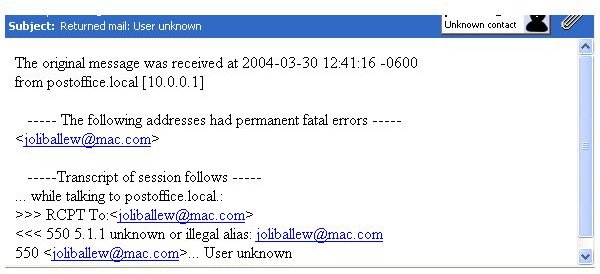
Click OK to verify you want to proceed. Here’s what the response will look like to a user on the other end. [See Image 1]
Advertisement
The only problem with the Junk Mail filter is that the sender’s e-mail address for return mail has to be valid. For spammers, this is not usually the case. This procedure will not help if the spammer’s e-mail return address is not valid.
Take a look at the other two articles in this series:
Creating Rules
Using the Junk E-Mail Filter
Additional Articles
Article Series Links
Part I: Creating Rules to Control Spam
Part II: Using the Junk E-Mail Filter
Part III: Using Bounce Sender
Other Articles You May Enjoy
Apple Mail: Create Folders and Subfolders to Organize Email You Want to Keep
Maintain Your Mac: How to Organize and Clean Up Email


