Various websites are listing downloads for proofing tools for the latest version of Microsoft Office - but these are fakes. In truth, the popular office suite already features proofing options for many different languages.
Polish Your Documents with Proofing
There are various tools included with Microsoft Office 2011 that make the task of preparing a polished, professional-looking document remarkably simple.
One of the most obvious ways of producing a good finished document is to take advantage of spell-check and other dictionary-related proofing tools. Each version of Microsoft Office 2011 features core proofing tools specifically designed for use with the native language of that version of Office. For instance Microsoft Office Mac: 2011 in Spanish features proofing tools that can be used in Spain and Spanish-speaking South American countries.
However if you need to use MS Office 2011 proofing tools in a different language, they are included in the software.
Spell Check and Grammar Functions in Office 2011
While all of the main Microsoft Office: Mac 2011 applications feature a spell check facility, it is most commonly used in Microsoft Word.
On the Mac, this is initiated by pressing OPTION+COMMAND+L, and using this tool you can check the text of the open document using the currently selected proofing language (the OPTION and COMMAND keys can be found in the lower-left corner of the keyboard, beside the spacebar).
In addition to spelling, the grammar of the text will also be checked; this is useful in English, and if you’re proofing documents in a second language this function gives you an additional advantage to successful editing of the file.
You can also open a spell check facility in Outlook and PowerPoint .
Adding a New Proofing Language to Word 2011
Writing and editing documents in additional languages in Word 2011 is easily setup and activated, requiring only a few mouse clicks.
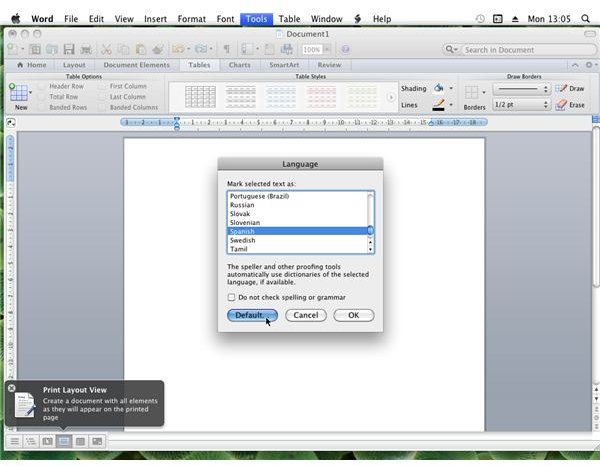
In Microsoft Office Word: Mac 2011, open Tools > Language… and choose the language that the document has been typed in or which you intend to begin using.
Click OK to continue, although note that you can check a box to prevent spelling and grammar checking. Note also that the Tools > Dictionary… menu item will open the reference tools for Microsoft Word: Mac 2011, allowing you to select between English, Japanese, German, French and Spanish dictionary, synonym and thesaurus tools.
(Screenshot by author)
Can I Download Microsoft Office 2011 Proofing Tools?
If you require additional proofing languages in Microsoft Office 2011, you will need to add them from the installation disc as detailed above. No additional proofing languages and tools have been made available as yet, although there is every chance that future updates will add more languages to the software. Future additional languages may also include right-to-left text support.
Note that if you seem to be offered the chance to download Microsoft Office: Mac 2011 proofing tools from the web that these links are very likely dangerous and could result in you inadvertently downloading dangerous data (malware, etc.) to your Mac.
Additionally, these types of link should be avoided as they are promoting the use of pirated software.
References
Author’s own experience.


