There are many different ways to open PDF files, from the Finder to a web page where you might read the document using a browser plugin. You might also launch a PDF from a hyperlink embedded in a Microsoft Word document…
Microsoft Word: Mac and PDF Links
With Microsoft Word: Mac you can perform various tasks and apply a variety of formatting options in your documents with the minimum of fuss, such as inserting images, tables and links.
There are various ways in which you might include links to other content in Microsoft Word: Mac . For instance you might embed an entire other document within your Word document, or feature a small segment of it. You might do this by including a few lines or making a screen capture of the content concerned, or you might include the full document.
Another way is simply to link to the other content. This is largely a preferred option as it allows more flexibility and avoids formatting issues that might occur when embedding content. A hyperlink is also a particularly good way of opening a PDF from within Word for Mac.
Inserting Other Documents into a Word for Mac Document
The Insert tool is particularly useful in Microsoft Word: Mac 2011, allowing you add a variety of interesting media into your document.
For instance using the Insert section on the ribbon, you can add a Text Box, Shape or Picture to your document, while the main Insert menu allows the addition of a Watermark, an HTML Object, a Hyperlink or any number of Photo, Audio and Movie types, to name but just a few.
To insert another file, for instance, use Insert > File… and select All Readable Documents from the Enable dropdown menu before browsing to the file you want to add and clicking Insert.
A similar process is available for adding images and other media clips.
How Do I Open PDFs from Mac Word with a Hyperlink?
If the document type that you wish to insert or embed within Microsoft Word isn’t available, then the only option is to open it from a hyperlink using Word’s HTML features.
This is a great way to feature a PDF document within Word, as embedding it isn’t an option in Word for Mac. PDF is a popular format, most commonly opened in Adobe Reader, although Safari can also be used for reading PDF files on the Mac.
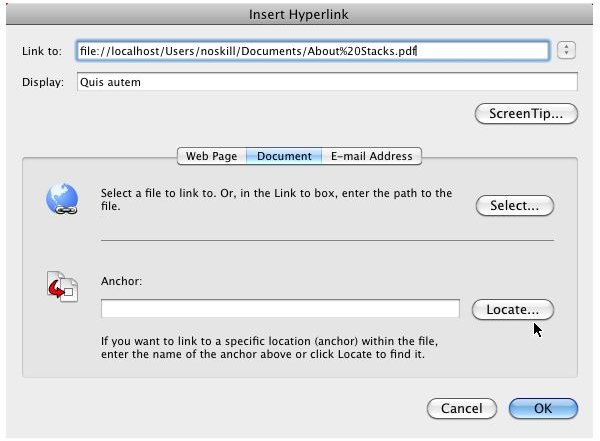
In order to open a PDF document from Mac Word you will need to insert a hyperlink to the PDF format document. Begin by selecting the text you wish to use for the link, and then use the Insert > Hyperlink… option to add the URL of the file with the Web Page option or the local path of the file using the Document option (using Select… to browse for the PDF document).
When you’re done, click OK – you will then be able to test the PDF link by clicking it to open. You shouldn’t run into any problems with this process as it is largely handled within Word, but if there are any issues, you should test open the PDF document outside of Word to check that there are no issues with it.
Screenshot by author
References
- Author’s own experience.


