Why would you want to install Internet Explorer on Linux? Well, you might be a web developer concerned about standards and compatibility…
A Microsoft Application on Linux?
There seems little point in anybody to want to run Microsoft’s Internet Explorer browser on a Linux distro – unless, of course, they are a web designer.
With the necessity of browser compatibility and accessibility , a designer must have access to at least three versions of the Microsoft browser, thanks to the differences regularly experienced between them.
Using the Linux distro Mandriva, Internet Explorer can be run in WINE - the popular Windows emulation environment. This can save a lot of computer swapping and even avoid the need for running a Windows guest operating system in virtualization software.
Note that these instructions can be followed successfully for any Linux distro
IEs4Linux Script
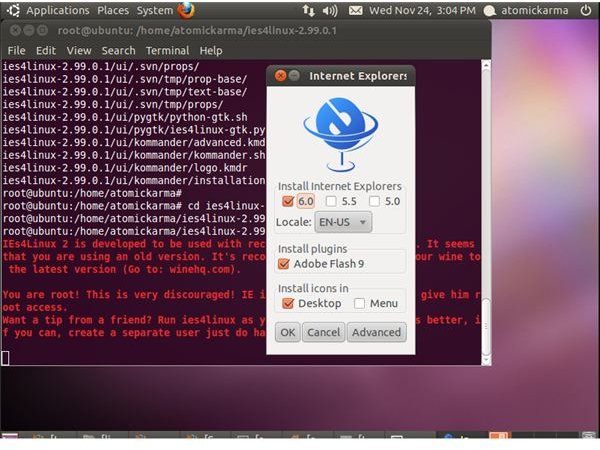
In order to install Internet Explorer on a Linux computer, you must first be aware of IEs4Linux. This is a simple script that will install three versions of Internet Explorer on your computer, with the aim of testing your site.
It is not advised to use these various versions of the IE browser for leisure, and also note that you need to be in possession of a valid Microsoft Windows license in order to use the IEs4Linux tool legally.
The IEs4Linux script will manage the installation of Internet Explorer 5.0, 5.5, and 6.0 on your Linux PC, while a beta version of the software will allow you to run Internet Explorer 7.0.
(Image by author)
Installing Internet Explorer with WINE on Mandriva
Additional software that you may not already have is required to install IEs4Linux – namely Wine and Cabextract. The first of these, Wine (as you may already know) is a Windows emulation environment which allows Windows applications to run on Linux.
Meanwhile Cabextract allows the extraction of .CAB files on a Linux system.
To get started find Wine and Cabextract in your Synaptic Package Manager, or install them via Terminal with the command:
su
urpmi wine cabextract
exit
With this additional software on your system, it is now time to download and extract the IEs4Linux software. Again, open a Terminal and enter:
wget https://www.tatanka.com.br/ies4linux/downloads/ies4linux-latest.tar.gz
tar zxvf ies4linux-latest.tar.gz
cd ies4linux-*
./ies4linux
Note that you can change the filepath in the wget command to https://www.tatanka.com.br/ies4linux/downloads/ies4linux-2.5beta4.tar.gz if you want to use the beta version with Internet Explorer 7 included.
Using Internet Explorer with Wine and Mandriva
Whether you’re using Internet Explorer with Wine and Mandriva or another Linux distro (such as Ubuntu ), you will now be ready to use Internet Explorer on your Linux system.
You should notice no difference between the page rendering on Internet Explorer on a Linux computer and a Windows computer – thanks to Wine the browser thinks it is running on Windows.
When downloading and extracting the IEs4Linux you might have noticed that it was pretty quick – this is because the script only contains a single browser plus the additions that Microsoft applied to update the earlier versions. This keeps the software compact and the process quick!


