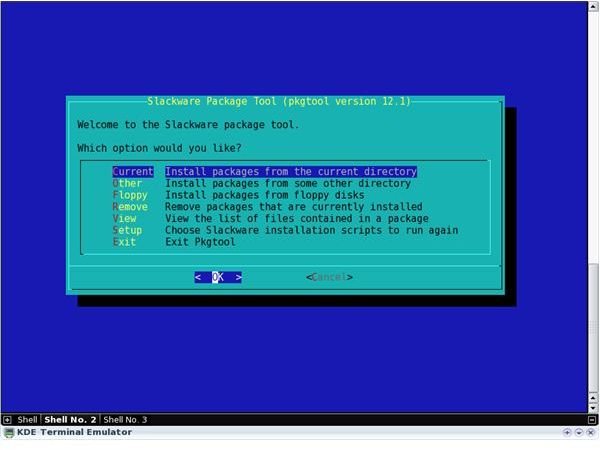
Slackware, which is known as one of the oldest distributions in the Linux world, has its own way of managing packages. The package format was changed in the 13.0 release and an official package manager is included.
Slackware is one of the oldest Linux distributions in the Linux world. It adheres strictly to the UNIX principles and is considered to be best for intermediate to advanced Linux users. Those users who want to control every single part of their operating system and are eager to learn may also find Slackware to be a good fit.
Slackware packages originally were g-zipped tar files (the files ending with .tgz extension), this changed officially with the 13.0 release to .txz files, and now the 14.0 release has even more features. The native package manager of Slackware can install, upgrade or remove packages from the distribution but does not work with remote files or check for dependencies. Slackware relies on the user’s knowledge when it comes to dependencies and assumes that they already have them installed, enabling the package to be installed. The user is not informed about any missing dependencies until he runs the software.
Pkgtool and Slackpkg
pkgtool is Slackware’s original package management tool, it allows you to install, update and remove packages. Its inability to work with remote files called for a need for an on-line package manager. In comes slackpkg.
Slackpkg is Slackware’s official package manager, this tool is not installed by default with the operating system; the user must download and install it manually. After slackpkg is installed, it downloads the file lists from the repositories and lets the user install the packages he wants. Slackpkg does not automatically resolve dependencies but you should rarely run into problems except when:
- a new compression scheme for the packages is rolled out, and
- a new file mirror is installed
The solutions to these problems are:
- install the new compression scheme,
- edit the mirrors file manually.
Slackpkg uses pkgtool to install, remove and update packages, just like apt uses dpkg. Think of slackpkg as pkgtool plus the ability to provide automatic updates from the Internet.
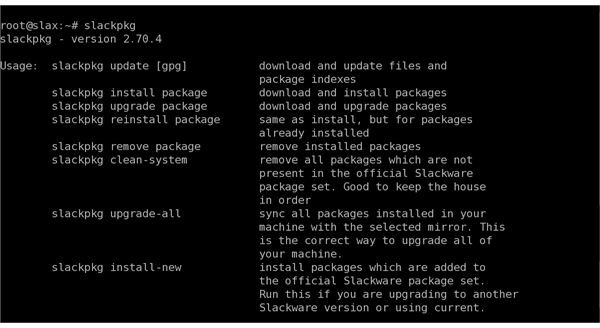
When you install slackpkg the first thing to do is to enable Slackware repositories in the /etc/slackpkg/mirrors file. When you are done, you are ready to use slackpkg. It has the following options (not exhaustive, but basic operations):
- update: Download latest package list from the official Slackware mirror (as stated in the mirrors file)
- search package_name: Search for the package named package_name
- install package_name: Install the package named package_name
- upgrade package_name: Upgrade the package package_name to the latest version
- reinstall package_name: Reinstall the package package_name if the installation is corrupt
- remove package_name: Remove the package package_name
- info package_name: Display information about package package_name
- clean-system: Remove all packages that does not belong to a standard Slackware installation
- upgrade all: Upgrade all the packages installed to the latest official versions
Slackware package management tools run from the command line and currently has no graphical user interface.
rpm2targz and rpm2tgz
The Slackware distribution provides built-in commands which allow you to convert Red Hat’s RPM package files to tar.gz or tgz files. Rpm2targz creates a Slackware compatible archive with the tar.gz extension and rpm2tgz creates an archive with the tgz extension. There is absolutely no difference between those two archives, it is just which filename extension you prefer. The usage is rpm2targz package_name.rpm or rpm2tgz package_name.rpm.
Slackware’s package manager, slackpkg, is a tool for installing or upgrading packages through a network. You can download a stable version, or an updated beta version. Slackpkg can be used to search for Slackware packages, install, upgrade, re-install, remove and many other functions.
References
- Slackware: http://www.slackware.com/
This post is part of the series: Linux Package Management
In our series about the package management process in Linux, we will start from scratch, talk about the software packages, the dependencies, their resolutions and then analyze the package management systems of the mainstream Linux distributions.


