If you have the scanner that works under Linux, the only thing you need is a scanning software. Inside is our purchasing tips and how to use the scanning software.
Introduction
The biggest part of scanning lies in the hardware (the scanner) not the software. In order to use your scanner under Linux, you need to go for a supported model. If you do not have a scanner, the next section will guide you through the purchasing decision.
There are two well-known scanning software for Ubuntu: XSANE and Kooka . Both are very good programs, but, unfortunately, Kooka was dropped from KGraphics module due to lack of development. As of today, only XSANE is under active development. If you already have a scanner, then you can skip to the XSANE section.
Purchasing a Supported Scanner
Scanners are the second major problematic hardware components, following TV cards. Because of this, I suggest you check your distribution’s hardware compatibility list to see if your scanner is supported before purchasing one. If you are an Ubuntu user, you can check the hardware support for scanners . It is a good idea to go with a supported but older model rather than an unsupported and brand-new one. For a casual home user, such as I am, you can go for something like a Canon CanoScan Lide 25, which is supported and works out of the box.
XSANE
XSANE is a front-end for the SANE (Scanner Access Now Easy). You can install the program from the Synaptic Package Manager or from the command line via apt-get install xsane. When the installation is complete, you will find the program under Applications -> Graphics -> XSane Image Scanner.
To avoid problems during set up, I suggest you plug in your scanner first and make sure that it is properly recognized and working before you fire up XSANE.
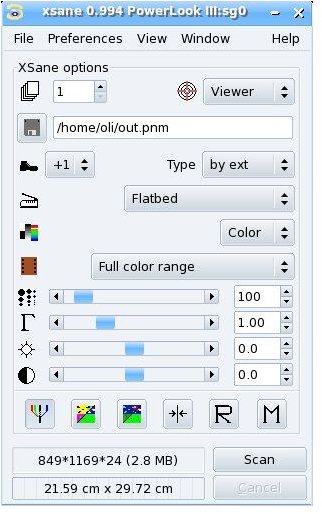
XSANE is a very simple yet a powerful program. As you see in the screenshot, you just set the basic configuration options and hit the “Scan” button to scan your image. Before you start scanning, I suggest you change the directory where scanned images will be saved. In the screenshot, it shows /home/oli/out.pnm, but it is better if you change it to something like /home/your_user_name/Scanned_Images (I learned this from experience. I used the default “Photos” folder and it quickly became a mess).
XSANE can also be called from inside GIMP. If you have GIMP installed then installing the xsane package installs the GIMP plug-in. You can go to File -> Acquire -> Xsane and transfer your photos from your scanner directly to GIMP.
Conclusion
Using scanners with Linux is not a big deal and it is more fun that the *other* operating system. However, as I stressed above, you need to have a scanner that is supported and working under Linux. If you are considering purchasing an all-in-one printer/scanner/photocopier/fax device, you can check Ubuntu’s relevant page on the compatibility list.


