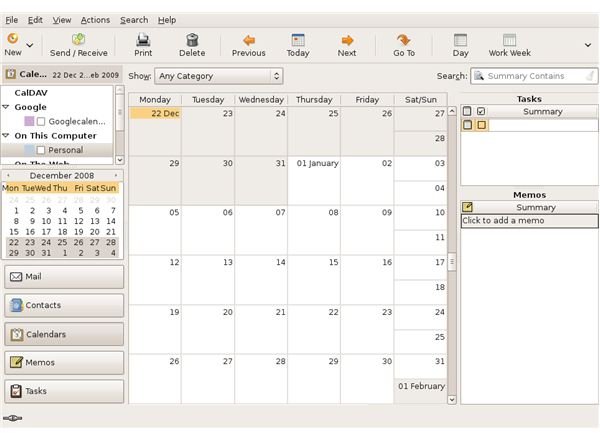
Evolution is a full featured email, scheduling and contact manager. It comes standard when you install Ubuntu Linux. Why should you use Evolution over other email applications? It’s simple, desktop integrated and open source.
Evolution is an email, scheduling and address book program. Like many applications designed for Linux, Evolution is open source. It’s designed and releases as a Groupware project from Novell, Inc.. Evolution is a lot like any other email and scheduling program. It lets you download email, keep track of multiple calendars, schedules and To-Do Lists. And, of course you can sync Evolution with other calendar programs and your mobile devices. I think the coolest feature Evolution offers is integration with the GNOME desktop. When you use Evolution with Ubuntu, or any other GNOME platform, it is fully integrated with the system calendar. This means you can view tasks and appointments from the desktop calendar, without opening Evolution.
Plug-Ins
Get the functionality you need without clogging your system with things you don’t. Plug-ins come pre-installed in Evolution. You can turn on the ones you want and disable the ones you don’t. Evolution’s plug-ins let you do things like:
- sync Evolution Calendar with your online Google Calendar.
- Pop up a reminder if you forget to add an attachment to your email.
- Support for CalDAV.
- Add Contacts to your address book automatically.
- Convert tasks in email to your Task List
- Add weather calendars to your Evolution Calendar.
- Lots of other functions
Calendar and Task List
Evolution Calendar easily rivals the well known and expensive calendar programs out there. Setting up calendars and task lists is a snap. The ability to add multiple calendars and task lists means you can keep your personal, work and family schedules in separate places to avoid clutter and confusion. There’s also a Memo function for notes.
Address Book
The Evolution Contacts tab is easy to use and lets you add as many different address books as you’d like. This makes it easy to keep work, family and friends contact information separate and easy to find. And, if you do misplace a contact, the search function makes it easy to locate the missing information.
Unlike some email address books, Evolution gives you the ability to store full contact information, including physical address, multiple telephone numbers, and notes like birthday, anniversary, or other important dates.
You can also create email or other contact lists with just a click.
We’ll talk about where to download, how to install and configure and how to use each feature in detail in future articles in this series.
This post is part of the series: Evolution for Ubuntu - Everything You Need to Know
Evolution is a great open source email, scheduling and contact management program. It comes standard with all Ubuntu Linux downloads. Learn how to take advantage of all the features offered, so you can get the most out of Evolution.


