The hardware health of the motherboard is extremely important for the continued operation of the computer.The motherboard holds the circuits that keep the components together. This includes the CPU, memory, controllers for various adapters. The software discussed here helps maintain its stability.
Hot CPU Tester
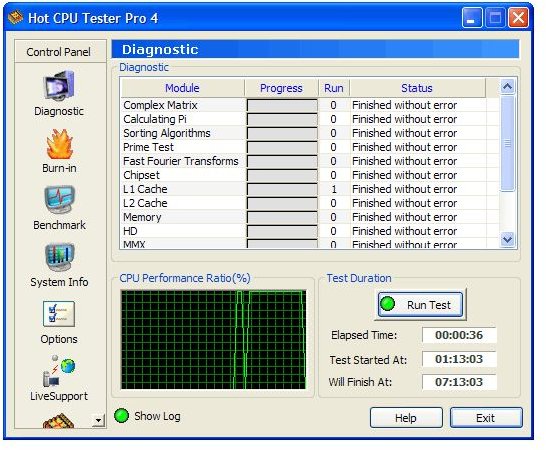
Hot CPU Tester Pro is a motherboard strength and stability tester. It tests many different components like the CPU, chipset and practically all parts of the motherboard for defective parts, errors/bugs and components. It is a burn-in test with a DefectTrack engine. DefectTrack is a technology developed by 7Byte to diagnose computer systems regarding the stability and the systems health. This is freeware.
Source: 7Byte
See Also: How to Use Motherboard Diagnostic Card
Fresh Diagnose
A second, freeware, motherboard diagnostic tool is Fresh Diagnose from Fresh Devices. It can provide in-depth system Information by first scanning your computer and then providing a complete report about the system’s hardware and software. You can get details about the mainboard, PCI / AGP busses. You can also get video system information, and information on peripheral devices like the keyboard, printer, and mouse. You can get details on Windows registry settings, and any network you may have connected.
System Benchmarks are the result of testing your system performance, such as CPU, CD/DVD ROM, hard disk, and you can compare it with other systems.
Source: FreshDevices
ASTRA - Advanced Sysinfo Tool
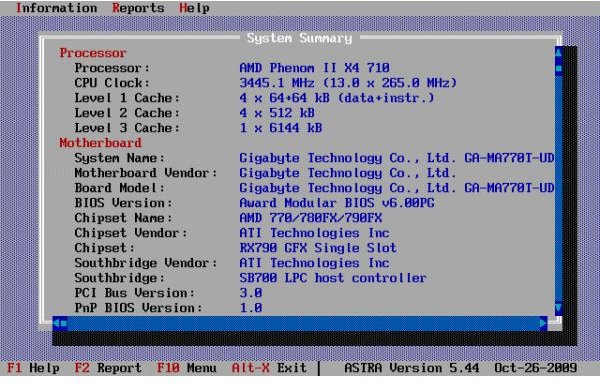
Like the previous software diagnostic tools, this program performs system configuration analysis and diagnostics. It provides detailed information about the system hardware as well as devices operational modes. It even provides undocumented information; something that the other programs do not include. However, there is a Hard Disk Drive Health Status checker which provides information on CPU, motherboard, hard disks, chipsets, memory modules, BIOS, PCI/AGP, ISA/PnP and PnP devices. This program also generates a report file in plain text, XML, INI, HTML and CSV format. The DOS version is designed for system restore purposes.
Source: Astra
HeavyLoad
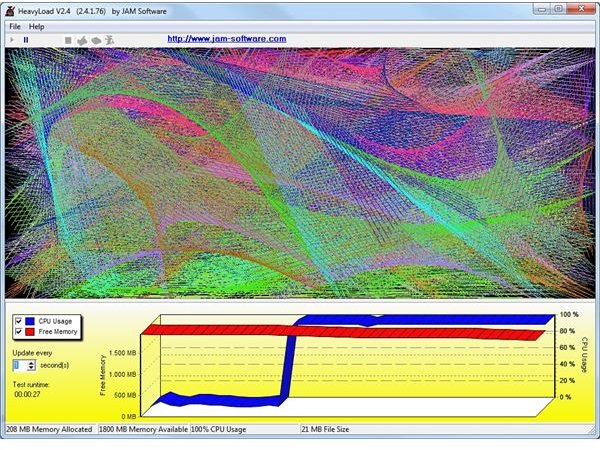
Heavyload is a stress creating program. All resources of a PC, RAM, the CPU, network, hard disk, and operating system are tested in order to find out how reliably the system performs under a heavy load. In the case of important file or database servers, it is essential to know how they will perform before using them in production. Another test result will be just to check if a PC or server might get too hot when used intensively. To perform the stress your server or PC, HeavyLoad creates a large test-file and stores it on the temp folder. Then, it allocates physical and virtual memory to the test and performs various, complex, calculations. It draws patterns in its window and describe the result.
Source: Jam Software
Summary
The freeware programs listed here offer a variety of tools that test and identify performance problems. They perform stress tests, compare operations with or without cnnections to other devices on the system. They can be used to investigate how computers or servers may perform before putting them in a production environment.
For more information see:Motherboard Troubleshooting Techniques - Understand the Diagnostic Tools


