When PC shopping, you may have noticed that some PCs have the words ‘motherboard onboard video’ listed in the tech specs. Also, if you are building your own PC, you may have noticed that some motherboards come equipped with onboard video. This article explains motherboard onboard video technology.
Motherboard Onboard Video FAQs
Before we get started discussing the capabilities of motherboard onboard video, take a look at this FAQ. It may answer any questions that you have about onboard video.
-
Q: What is motherboard onboard video?
Advertisement -
A: Motherboard onboard video is just what its name implies, a video chip, or video capabilities, that are built-in to the motherboard.
-
Q: Is motherboard onboard video the same as a graphics card or video card?
Advertisement -
A: Yes and no. Motherboard onboard video is not like a graphics card because it does not attach to the motherboard using a PCI or PCI Express slot. However, motherboard onboard video is similar in basic purpose to a graphics card or video card.
-
Q: Does motherboard onboard video require a graphics card or video card?
Advertisement -
A: No, motherboards that have onboard video features do not require you to have a graphics card or video card as well. However, you may want to add a card anyways, to get better video performance out of your PC.
-
Q: Should I purchase a motherboard or computer with onboard video?
Advertisement -
A: Motherboard onboard video is not always necessary. When purchasing a new PC, you likely will not be able to choose whether you want motherboard onboard video. A PC either comes with it or doesn’t. This is completely fine, and shouldn’t have any negative effects on the video capability of your PC. Often, laptop PCs rely on motherboard onboard video. When building your own PC, you can choose whether or not to purchase a motherboard with onboard video. However, if you get a motherboard that does not have onboard video, you will need to purchase a graphics card.
The Purpose of Motherboard Onboard Video
Motherboards have onboard video so that you do not have to buy a separate graphics card in order to have video and graphics on your PC.
Desktop PCs without onboard graphics
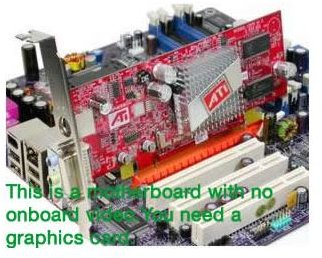
A video card/graphics card will go into an available PCI or PCI Express slot on your motherboard. From there, you can plug your monitor into the graphics card, allowing your PC to display graphics on the screen. For example, on a desktop PC without onboard graphics, you connect the monitor to the back of the PC via a graphics card.
Desktop PCs with onboard graphics
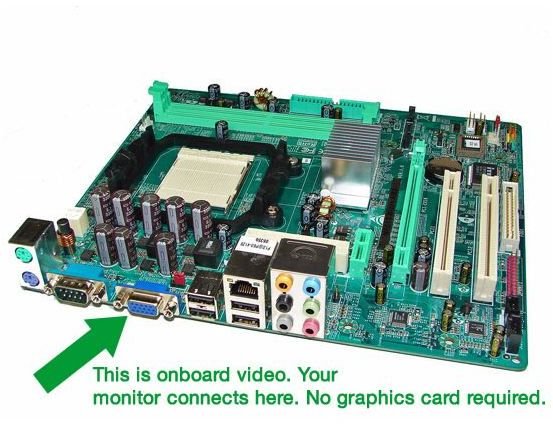
If you have a desktop PC with onboard graphics, you can connect your monitor to your PC via the onboard graphics, directly into the motherboard.This is a feature that isn’t really noticeable without opening up your PC. Both onboard graphics and graphics cards use connection types such as VGA, DVI, and HDMI. Onboard graphics basically means that your motherboard has built-in video processing capabilities; no video card or graphics card required.
Laptop PCs with onboard graphics
Onboard graphics are highly popular on laptop motherboards. Why? To save space. A graphics card takes up quite a bit of room, and because today’s laptops and netbooks focus on being ultra portable, there is simply no space inside for a large graphics card or video card. Thus, computer manufacturers use motherboards with onboard graphics to display video on the laptop screen.
PCs with both onboard graphics and video cards/graphics cards
It is possible for a PC motherboard to have onboard graphics capabilities and a video graphics card. Most of the time, onboard graphics are a bit limited, and may not have enough power for video intensive PC work and gaming . Thus, many people choose to add a video card as well, in order to add more video processing power to their computers.
See both pictures below to see an example of onboard video vs. graphics card video.
Motherboard Onboard Video vs. Graphics Card Video