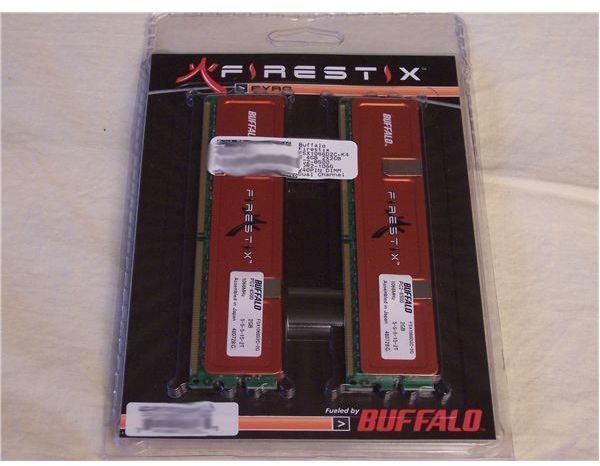
DDR3 has driven the prices on DDR2 way down, and stepping up to 4 gigs is a tempting option; but should you go with cheap or affordable?
Time to Get New Memory
DDR3 memory is set to take over , and your computer probably takes DDR2 (read a comparison here). That isn’t bad news though. Prices on DDR2 have dropped and continue to drop, making an upgrade a good idea. You can get another two 1 GB sticks to match the ones you already have for less than 50 bucks; a lot less than 50 bucks if your existing memory isn’t particularly fast.
And we aren’t talking CheapTech Brand Corporation of No Fixed Address products either. Corsair, OCZ, Buffalo, Crucial, Kingston, and the other big names, along with their resellers, are all happy to get DDR2 out of their warehouses. Expect big discounts and look for big rebates.
The thing is, DDR2 is getting so cheap; should you just get that extra 2 gig to match your existing memory, or find another use for the existing memory (there is always eBay) and get a shiny new 4 gig kit?
Out with the Old, In with the New
Instead of going with another pair of 1 GB OCZ Platinum XTC Rev.2 PC2-6400 for about $50, I found a pair of 2 GB Buffalo Firestix PC2-8500. After a big discount from the reseller and a rebate from Buffalo, they came in just under a hundred dollars.
This allowed me to put my old memory to use in another computer, and allows us to see what difference the extra speed (PC2-6400 runs at 800Mhz, PC2-8500 runs at 1066Mhz) makes.
The Old:
- 2 x 1 GB OCZ Platinum XTC Rev.2
- OCZ2P800R22GK
- PC2-6400; DDR2 800MHz
- 4-4-4-15
The New:
- 2 x 2 GB Buffalo Firestix
- FSX1066D2C-K4G
- PC2-8500; DDR2 1066MHz
- 5-5-5-15
Test Configuration
One advantage of faster memory is, if you have a reasonably fast CPU and motherboard, you can get them to run at speeds closer to each other.
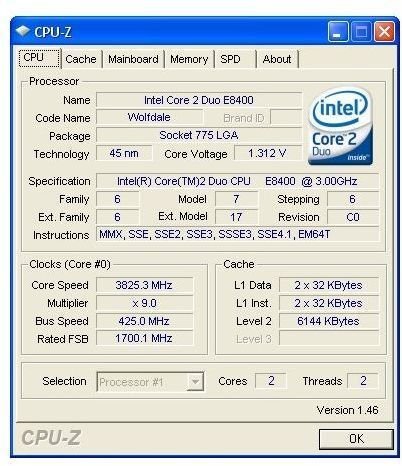
Newer CPUs have Front Side Bus (FSB) speeds of 1 066, 1 333 or even 1 666 MHz. Intel locks the multiplier on its non-Extreme CPUs, so overclocking one of those CPUs involves taking your FSB even higher. As shown by the CPU-Z screen capture, the test bed’s FSB runs at 1700 MHz. The other system specs are below, and the test results are in the next article.
-
 Advertisement
CPU: Intel Core 2 Duo E8400 OC: 3.82GHz, L2 Cache: 6MB
-
Motherboard: Asus P5N32-E SLI, Rev A2 Chipset: nVidia 680i Bios: 1404
Advertisement -
Memory: 2 X 1GB OCZ2P8001G OCZ Platinum PC2-6400 800Mhz
-
Video Adapter: BFG 8800 GTS (640MB DDR3, PCIe 1 x16, 500Mhz)
Advertisement -
Monitor: SyncMaster 205BW, 1680 x 1050, 32-bit
-
Hard Drive: Western Digital Caviar 250GB WD2500KS, SATA 300, 16MB Cache, 7200 RPM
Advertisement -
Power Supply: Silverstone Zeus 750W ST75ZF
-
Optical Drive: Sony DVD RW DRU-820A
Advertisement -
Enclosure: Thermaltake MozartTX
-
OS: MS Windows XP Home SP2 5.1.xxxx
Advertisement
This post is part of the series: Upgrading to 4 GB - What Difference does it make?
We increase the amount and size of our computer’s memory to see what kind of difference it makes.


