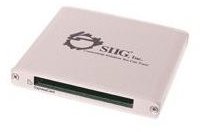
There are several USB ExpressCard adaptors available on the market that will enable you to connect low-bandwidth ExpressCard devices to your PC or laptop - but is it worth the expense if the options are so limited?
How Does ExpressCard Differ to PCMCIA?
Developed and introduced as a replacement for PCMCIA , ExpressCard is a much faster card-slot that can be found on many laptops produced in the past few years. Designed to enable high-speed connectivity for various external devices, ExpressCard is most popular as an expansion port for laptops (although there are other uses such as external graphics cards).
However, times are changing and with the introduction of USB 3.0 and e-SATA , you might find that by upgrading your laptop you use the additional functionality that an ExpressCard delivers.
Luckily there are some solutions available to you here, most notably with the use of USB ExpressCard readers that can be connected to the USB port of your new laptop.
Note that these devices will only run at the maximum USB 2.0 bandwidth, so PCI Express-based ExpressCard devices cannot be used.
SIIG USB to ExpressCard Adapter
One of the top choices to afford you the flexibility of an ExpressCard on your laptop or desktop is the SIIG USB to ExpressCard Adapter, which uses a spare USB 2.0 port on your computer and adds a single ExpressCard/54 slot.
Designed to allow the use of wireless WAN modems (such as those that afford GPRS, CDMA, EDGE connectivity) as well as flash storage, security card readers and legacy expansion options, the SIIG USB to ExpressCard Adapter is available online for between $25 and $35.
Image credit: https://www.siig.com/
Sony SBAC-US10 Card Reader
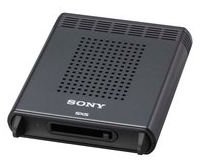
Suitable for ExpressCard/34 devices, the much more expensive Sony SBAC-US10 Card Reader (available online at upwards of $250) comes equipped with its own AC adaptor in order to deliver an independent power supply.
Designed for use with a Windows or Mac PC that doesn’t have its own ExpressCard slot, you can use the Sony SBAC-US10 Card Reader specifically with narrower, ExpressCard/34 storage devices. Connected to a USB 2.0 port the device allows a data transfer rate of 160 Mb/s write, 240 Mb/s read.
Image credit https://pro.sony.com/
SIIG USB to ExpressCard Bay Card Reader
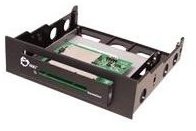
If you require a USB-based ExpressCard reader for your desktop PC, the SIIG USB to ExpressCard Bay Card Reader comes suitable for use with a 3.5 inch or 5.25 inch bay on your PC and connects to a spare USB port on your motherboard.
Like the external SIIG device above, this device is suitable for non-PCI Express ExpressCard devices, enabling you the expansion options of wireless WAN, flash storage and security card readers and various legacy expansion options, as well as external optical disc drives.
This internal device can be purchased for a starting price of just $11 online.
Image credit: https://www.siig.com/
Is an ExpressCard Reader the Right Option?
As we’ve seen, the options are limited for external USB-based ExpressCard readers. The reasons for this are multiple – the format is dying, as is USB 2.0 (although USB 3.0 is backward-compatible), so it makes little sense to spend money on any of these options.
With the limits of the USB bandwidth restricting the option further still, you might decide to forego the option entirely and invest instead on expansion options that your new laptop can use.


