If you want to be able to navigate your tablet’s full file structure, remove pre-installed applications and generally become the device superuser, you need to have root access - something achieved by “rooting” your Android tablet!
Root Access on an Android Tablet
Android tablets are becoming more and more popular as an alternative to the iPad, and with this level of platform take-up comes a requirement to “root” the devices. Acquiring root access in an Android device enables you to install software that can perform tasks that others cannot – for instance, wireless data transfer, backup and even screen capture tools can be installed.
Rooting might be common amongst a certain segment of Android phone owners, but it is a little different with an Android tablet. Once completed, however, establishing Android “root access” will allow you to install even more free software for your tablet!
Rooting Risks
Before leaping into the “root community” there are a few things of which you should be aware.
Most importantly there is the issue of security. By rooting your device you allow downloaded apps access to the root directory of your tablet, which can potentially lead to unsafe applications being downloaded and installed that can damage your hardware.
Additionally, should you need to return your tablet to the manufacturer for any reason, rooting it will void the warranty unless you first undo the root.
Rooting Gains
However, with the above firmly in mind, there is every chance that rooting your tablet will enable you to use the device in better and more efficient ways.
For example, if your tablet is 3G-equipped then you can in theory use it as a tethered internet connection for a PC or laptop, but most notably you will be able to use any software that demands SuperUser permissions from your tablet as well as allow create full backups with certain utilities and even flash (a term meaning to install onto the tablet’s ROM chip) custom versions of Android!
Gaining Android Root Access with z4root
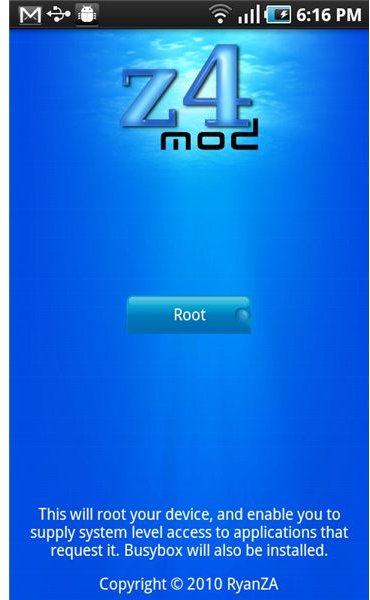
Specifically designed for Android 2.2 Froyo (the version commonly found on Android tablets such as the Advent Vega ), z4root is the ideal utility for gaining root access on an Android tablet. Sadly not available on the Market, you can download the free utility direct to your tablet from iamjake648.com/z4root.apk or from handheld.softpedia.com .
After download you will need to drag down the status bar and tap the downloaded .APK file in order to install the software. Next head to your programs list where you should find z4root listed at the bottom.
Tap the icon – you will be given three options:
Root: this roots your device. Before selecting this, go to Settings > Applications > Development and ensure that USB debugging is enabled.. When chosen, the Root option will restart your tablet.
Re-root: this will root your device again and should also be used after enabling USB debugging.
Un-root: for removing the root access to your tablet, this option does not require a restart.
As you can see, enabling Android root access need not be a permanent thing, and when combined with some of the most powerful apps available in the Market, root access can turn your Android from a basic web-browsing tablet into something more closely resembling a computer!
Screenshot via https://getandroidstuff.com/rooting-froyo-z4root-app-easy-painless-root/
References
Addictive Tips : Z4root App for Android


