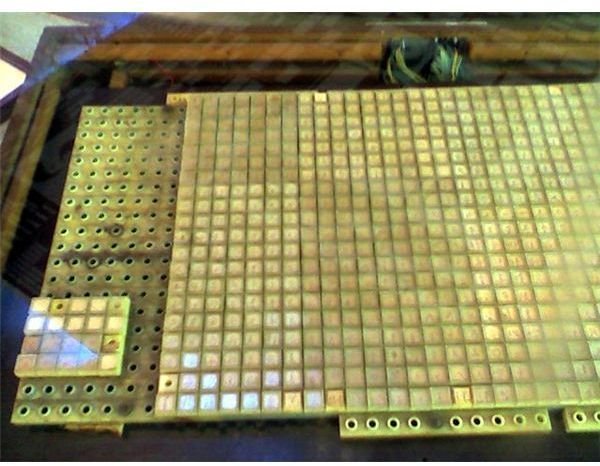
Have you ever wondered how they fit the thousands of Chinese characters on a single keyboard? Actually there is more than one type of Chinese keyboard. We look at them below along with some screenshots.
Chinese Characters
While the number of Chinese characters is well over 40,000, full literacy in the Chinese language requires knowledge of between three and four thousand characters. It is therefore no mean task to attempt to fit all these characters onto a traditional keyboard, though there have been attempts to do so.
So where do you find a Chinese keyboard that has all these Chinese characters? Actually, there is no standardized Chinese keyboard. Instead, an “input method editor” is used to allow traditional keyboards to enter the thousand of characters that are written in Chinese. Some of the more popular systems include Wubi and Pinyin.
Pinyin Input Method
The pinyin Chinese character input method uses a Chinese transliteration technique to enter the complex Chinese characters. In essence, it involves typing the alphabetic equivalent of Chinese words as it may sound to a listener. In most instances the system will choose the correct Chinese character. But if it doesn’t, such as in cases where the user hasn’t entered a very specific transliteration, the system will then present a list of possible characters from which the user can choose the correct one.
Using the pinyin method is not a very efficient Chinese characters input method, owing to the fact that many Chinese words sound alike but often look different when written. Fortunately, the input accuracy of the pinyin system can be improved by training the software to the user’s style of character input.
Wubi Input Method
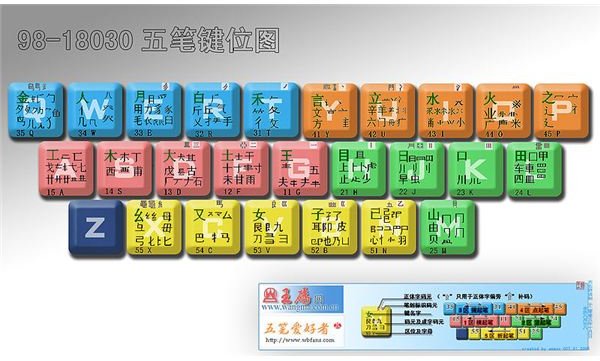
An input method that is preferred by speed-typist, particularly in Mainland China, is the Wubi system. A Wubi keyboard has a layout that is similar to a traditional keyboard, but has the basic components of a Chinese character mapped to each key. The typist enters a Chinese character by pressing the sequence of keys that represent the components that make up each character, with each component being typed in the order they would have been written to make up the character.
Of such, the Wubi system can be used to write characters with by using only 4 strokes. In cases where a character needs more than 4 strokes, it can be written by entering the first 3 strokes and then the last one. It is said that this 4-stroke system can uniquely represent all the characters even though many require more then 4 strokes.
What Chinese Keyboards Look Like
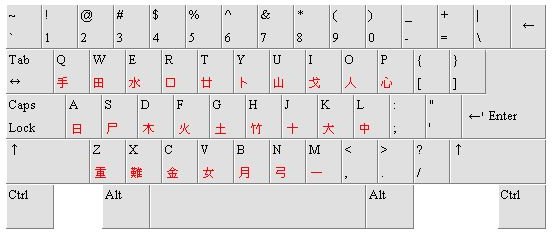
There is really no standardized Chinese keyboard, and in fact you may see different styles depending on whether you are in Hong Kong, Mainland China or Taiwan. However, it is possible to enter Chinese with a traditional keyboard, for this to work a pinyin software-based system needs to be used.
In fact, most operating systems do have support for Chinese keyboards, with many offering an onscreen option. There are also keyboards that physically print Chinese characters onto the keyboard – as discussed previously the Wubi system uses such a keyboard.
Reference:
Slate.com, What Does a Chinese Keyboard Look Like?
Wikipedia, Wubi method
Image Credits:
Wiki Commons, “Wubi System - what does a chinese keyboard look like ”
Wiki Commons, “Large Experimental Chinese keyboard ”
Wiki Commons, “Typical Chinese Keyboard Pictures s”


