AMD’s laptop processor lineup is a mish-mash of brands & technologies that can confuse anyone. Here are some simple explanations that will help you find the right processor.
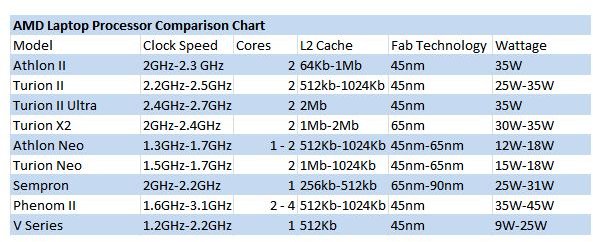
I’ve complained about Intel’s processor branding plenty in the past, but in truth Intel’s branding is a godsend compared to AMD’s laptop line. It’s a cobbled together list of terms and brands that are at times redundant and at other times vague. I have, however, done my best to create an AMD laptop processor comparison chart that lists everything the company currently offers. It is below (click to enlarge).
So, there you have it - but I doubt you’ll understand it. As I said, AMD’s branding is cobbled-together at best . So let’s take a look at this chart and figure out what this AMD laptop processor comparison chart is really telling us.
The Mainstream Processors - Athlon and Turion (Neo Excluded)
As you can tell, AMD has a lot of different Athlon and Turion product lines. Athlon is a product name that is shared with AMD’s desktop processors, while Turion is a unique brand name that is only applied to AMD’s laptop processors.
In laptops, the two brands are not drastically different. The Athlon II processors are somewhat slower overall thanks to lower clock speeds and less L2 cache (in most Athlon II models). However, both the Athlon and Turion lines are basically the same thing - mainstream processors built to inhabit inexpensive laptops with displays between 14 and 17 inches in size.
These processors are therefore, reasonably quick, and will have no problem with productivity applications, games, web browsing, and other such tasks. They may not be great for processor-heavy tasks such as audio/video transcoding, however.
The Ultramobile Processors - Athlon and Turion Neo
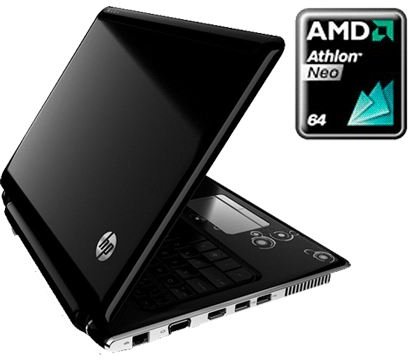
Although sharing a brand name with the more mainstream Athlon and Turion processors, the Neo line is designed specifically for ultraportables and netbooks that need to have great battery life but also adequate processing power. You’ll typically find these in systems between 10 and 13 inches.
The Athlon and Turion distinction vaguely continues here, with the Turion models generally representing the fastest products in the line, although the distinction is not at all clear because there isn’t much range between the lowest and highest available clock speeds. If you’re really concerned about portable performance, put a priority on buying a dual-core variant, as this will have more impact on your system’s performance than a modest clock speed boast.
Sempron and V-Series
The Sempron and V-Series laptop processor lines are AMD’s bottom-of-the-barrel budget options . They only have one core, and the clock speeds max out at 2.2 GHz. The V-Series also offers an ultraportable variant with a clock speed of 1.2GHz, which has a significantly lower power draw than other processors in these brands.
You’ll generally find these processors in laptops under $500, and while they’re functional, they’re the slowest processors that you can currently purchase for a laptop beside Intel’s Atom and perhaps some options from VIA. I recommend avoiding a laptop with a Sempron or V-Series processor.
Phenom II
As with Athlon, Phenom is a brand name that AMD shares between desktop and laptop lines. Just as with the desktop parts, the mobile Phenom II processors are the best that AMD has to offer. They have high clock speeds and 2 to 4 cores.
The Phenom II mobile processors are quick, but unfortunately, at the moment, they’re well behind what Intel has to offer in laptops . A Core i5 will easily outperform a Phenom II quad-core. However, Phenom II laptops are generally inexpensive, so you should look into laptops with the Phenom II processor if you need a powerful processor but you’re on a very tight budget.
Screenshots by author courtesy of AMD .


