You may have heard that using the Speed Dial extension for Firefox can help increase productivity and fill up the blank space in your New Tabs. It is very useful, but for those of you craving something with a nicer look and more control, Fast Dial will fill your needs and then some.
What is Fast Dial?
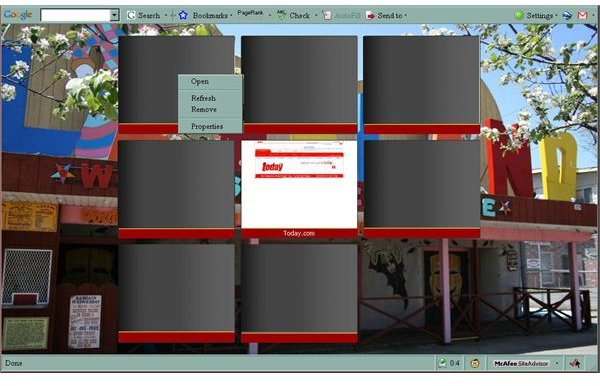
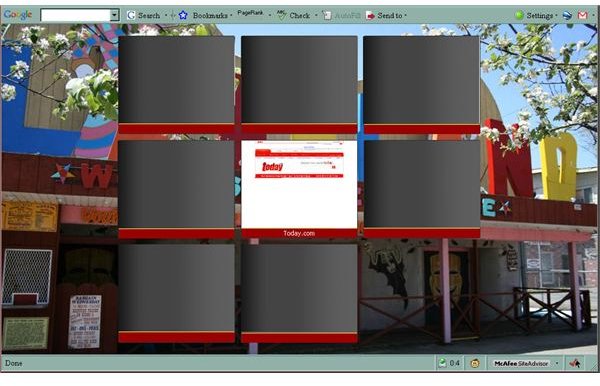
Fast Dial is an extension for Firefox. Once added, opening a new tab will display live previews of websites you’ve chosen. You can click on those previews to open a page, right click to change the settings for each item, and customize shortcuts to open them even without the new tab. You can use these live previews to store and access web sites you visit often, to increase productivity in your home office.
Improve Productivity
Using Fast Dial will allow you to close your links toolbar completely. If you put work-only links in Fast Dial, then your eyes won’t be tempted by that Myspace link. Save the links toolbar for after work websites and only view it when your work day is over.
By putting work sites in Fast Dial, your fingers never have to leave the keyboard to skip between all your important websites. If you have multiple email accounts, then throw those in there too. Establishing work-related sites as Fast Dial bookmarks will cut out the usual process of New Tab > URL or bookmark > website, this is especially true for sites where you must hit a log-in page. Just bookmark the log-in page URL in your Fast Dial bookmarks. You will be able to access the page from a new tab or, even better, with a quick keyboard shortcut, which saves a significant amount of your valuable time.
If you use multiple reference sites, put those into Fast Dial. You can set them to open as background tabs with a keyboard shortcut, then open as many as you need behind whatever website you’re viewing. Fast Dial allows you quick access to your most used websites while you work, without having to leave multiple tabs open. If you find yourself with 10 open tabs and your pages are begining to load more slowly, then Fast Dial is definitely for you.
Happy workers are more productive workers. Having an add-on like Fast Dial that allows you quick access to important websites and customization options will help keep you happy. I suggest using a background image that makes you smile. That could be a family picture, a picture from a special event, or even just a comic that makes you smile. Every time you open a new tab, you’ll see that image and your mood will lighten. This is a great way to give yourself a little lift without straying from your work.
Choose Your Previews
Fast Dial adds a folder in your bookmarks folder. Drag any existing bookmarks, or new ones, into that folder, then they will show up in your new tab automatically. The ranking in the folder dictates the ranking on your new tab display. The previews are live images of each site. You can set their refresh rate as well as how many of them refresh at one time, which can save you when trying to load other web pages. If you have an important website that you’d like to access easily, but don’t want a live image of the site popping up every time you open a new tab, you can choose an image from your computer to be the permanent image for that site’s preview.
Options
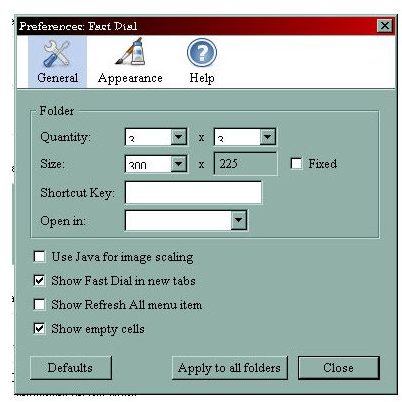
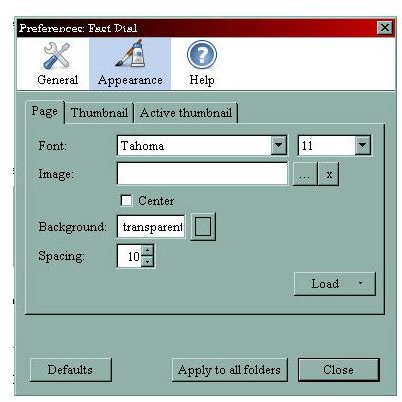
In your add-ons > Speed Dial > Options or just click the arrow next to the Speed Dial button on your toolbar. The General tab has the primary settings. You can choose to have up to 10x10 previews up to 400x300 in size. Assign a shortcut key and choose whether Speed Dial opens in a new tab, current tab, background tab, or new window when you use the shortcut. The shortcut key is limit to a single key, though. From the General tab you can also select/deselect four options: Use Java for image scaling. Show Fast Dial in new tabs. Show Refresh All menu item. Show empty cells. In the Appearance tab, there is three subcategories. You can customize the background, font, and cell appearance there. You can even use an image as your background.

Option Menu
Settings
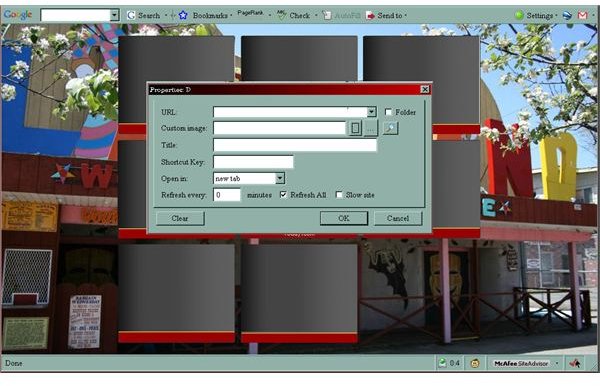
Right-click on any item in Speed Dial and you’ll have access to the settings for that single item. You can remove it from Speed Dial, refresh the image, or select Properties. The Properties menu displays the URL, which you can change. You can also assign a custom image, give it a title to display below the image, set the refresh rate for the image. You can use this menu to assign an individual shortcut key for each item. I find that extremely useful, especially since you don’t have stick with any pre-set shortcut. Pick your own. Also use this menu to choose whether a specific item opens in a new tab, current tab, background tab, or new window, another great setting.
Settings Menu