This article reviews the presentation component of a low-cost office suite, Kingsoft Office, which provides an alternative to the market leader Microsoft Office. It focuses on the presentation component, which is a key element of any office suite.
The latest version of Microsoft PowerPoint has not been universally welcomed. The interface is a radical change and the new file format can create interoperability and sometimes performance issues. This has created a market for alternative solutions. Most of these look uncannily like the previous incarnation of Microsoft PowerPoint (PowerPoint 2003). In this article, we shall review the presentation component of Kingsoft Office, which looks uncannily like Microsoft PowerPoint 2003.
Kingsoft Presentation
As with other elements in this suite, there is an uncanny resemblance to its Microsoft analog. Just look at this screenshot.
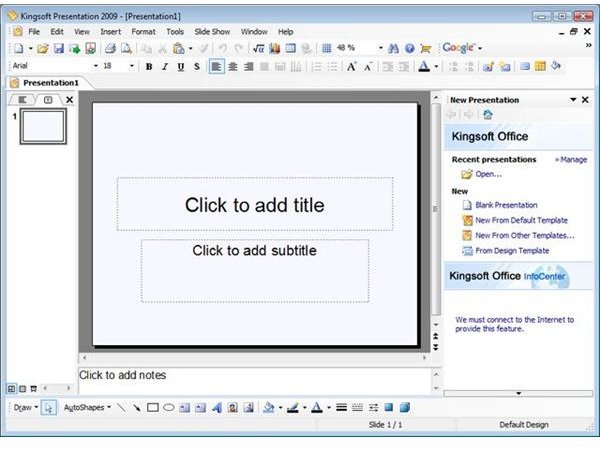
The lean philosophy produces a fast application. It loads quickly and was able to open a 10Mb .ppt file quickly and reliably.
The menu structure has the same headings as PowerPoint 2003. However, there are less options than those in the Microsoft product. As with the other elements of this office suite, it also lacks the “feature” where Microsoft PowerPoint2003 decides that it will only let you see the options used most recently on first sight of a menu. Inevitably, this does mean that some features of the Microsoft product are missing, but there are few signicant omissions for most mainstream users.
It offers a good choice of graphical objects from the Insert menu including graphics, sound, and flash objects, which can be imported as swf files, a facility not found in PowerPoint 2003.
As this component uses the common charting functionality for the suite, it is restricted to 2-d charts. However, as stated in the previous article in this series, this may be a blessing in disguise.
Kingsoft claim that Presentation offers a unique function in Double-Screen Extended Mode. Using this mode, the users can show speaker’s view and playing view on different monitors. The inclusion of an inbuilt Google search facility is again a nice touch, and could be used in this context to track down visual resources for use in presentations. One area where Kingsoft makes significant claims is in the development of distinctive design templates. There seems little evidence to support this as a unique selling point, but there are many available on the Internet in other formats that could be used, so this is not a major problem either. Similarly, the range of transitions appears to be comparable with the Microsoft product.
How does it compare to the alternatives?
Compared to PowerPoint 2003, the application is current and offers the prospect of ongoing support. It loses few features, and the only significant one I can identify is three-dimensional charting and whilst the visual impact of three dimensional charting may seem even more significant here, I repeat my assertion that this as a victory for substance over style. Once again, it offers the ability to write directly to pdf formats, which PowerPoint 2003 does not.
Compared to Open Office v3, it looks more like PowerPoint 2003 for the converting Microsoft user; it loads more quickly and opens .ppt files more quickly. It is not free for commercial use, but offers support in compensation.
Finally compared to PowerPoint 2007, it offers speed and simplicity of use. Its functionality, although less than PowerPoint 2007, is more than adequate for most users. It offers an alternative upgrade path from PowerPoint 2003 which is much less expensive and disruptive than PowerPoint 2007.
Overall, this is a very good presentation application and a viable alternative to both Open Office Impress and Microsoft Office PowerPoint. I am sure some users will object to the lack of three dimensional charting, but speaking as an academic information manager, I believe that this will save users from themselves!


