
Skype users have reported a dramatic increase in spam. While Skype doesn’t offer a fail-safe method of diverting spam messages and vishing calls, there are some steps you can take to guard yourself against unwanted messages and calls.
Skypers Getting Spammed
Skype is one of the most popular programs in Internet communications. As Skype’s popularity continues to skyrocket, its millions of users
have been experiencing an increasing amount of spam. Among the most annoying offenders are spam containing adult material, stock spam, account details, and shady lotteries from various countries. Users report receiving one to as many as 20 or more spam messages a day.
Unfortunately for Skype users, a spam filter similar to email spam filtering is not available. It appears that Skype has no plans to launch anything similar to that. However, you can take spam management into your own hands. Completely eliminating spam is unlikely, but by following some simple steps you will reduce your spam messages dramatically.
Privacy Settings
-
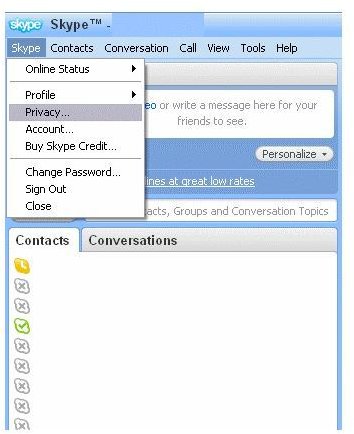
Set your privacy settings to only allow your people in your Contact List to contact you. Click on Skype on the top left-hand side of your Skype window. From the dropdown window, choose Privacy. You can also go to Tools, then Options.
Advertisement -
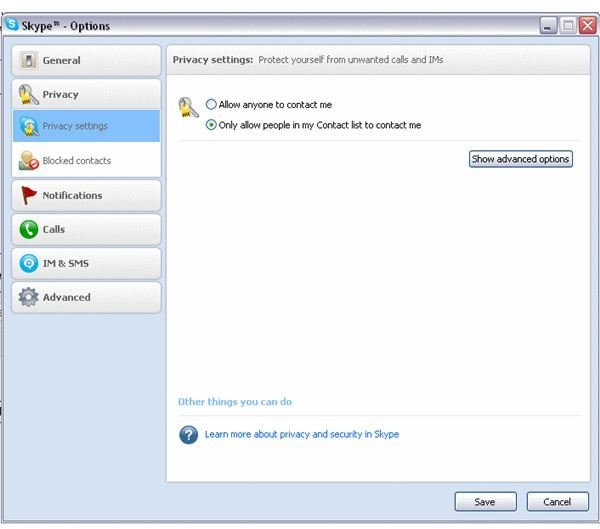
In the list on the right-hand side you will see Privacy Settings. Select the second privacy option (“Allow only people in my Contact list to contact me”) and then don’t forget to Save. This is the most important step. If you cannot choose this setting for any reason, trying the rest of these steps will help.
SkypeMe! (Only Supported in Mac)
-
Change your status. If you routinely leave your status set to SkypeMe!, you’re leaving yourself much more vulnerable to spam, especially because of the Skype Directory. In a similar vein, remove as much personal information as you can from your profile. Gender seems to be a particular flag for spammers.
Advertisement -
To change your status on a Mac, go to Account –> Change Status –> SkypeMe!
-
SkypeMe! is no longer supported on Windows versions of Skype.
Advertisement
Blocking
-
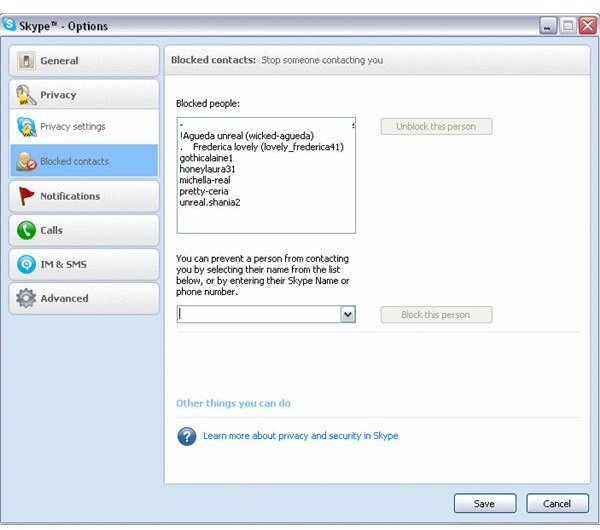
Block spammers. You can choose to block them from the message window or in your settings. By selecting Blocked Users in the Privacy window, you can see a list of blocked users as well as a pull down list of every user who has messaged you. You can select individual users from the list, then click “block this person.” This will not dramatically reduce the spam messages, but it will eliminate repeats and probably make you feel a little better.
-
To find the Blocked Users list go to Skype –>Privacy. Below the Privacy button you will see Blocked Contacts.
Advertisement
Changes to Reporting Abuse
-
In past versions, Skype Users could report abuse to abuse@Skype.net or via a complaint form on the Skype website. Now you are given the option to report abuse directly from Skype.
Advertisement -
RIght Click on a username –> Block This Person. The following dialog box will pop up.
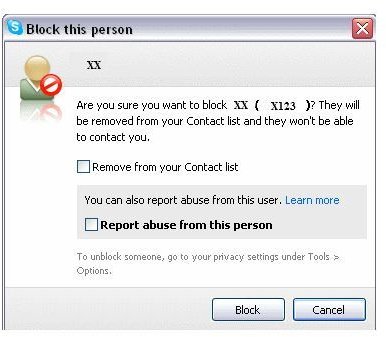
- Check “Remove from your Contact List” and “Report abuse from this person” boxes –>Block.
Alternatives
If you are being bombarded with constant spam and vishing calls and messages, you may want to consider an alternative to Skype. Google Talk has never really caught up to Skype in popularity but it does exist, and if you have friends with Gmail accounts you may want to try it.


