There are hundreds of Firefox plugins out there, and some of them I just can’t live without. Speed Dial is one of them, and can really improve home office productivity.
How it Works
The Speed Dial plugin for Firefox works in two ways. One way is via a toolbar button, the other is though tabs. You apply Speed Dial by replacing your blank tabs with a collection of sites that you use often. These web sites are noted by a thumbnail to help you remember what each represents. What makes Speed Dial indispensable to the home office worker though, is that it also has tabs. (Tabs within a tab! They’re coming to take me away hah hah …)
Speed Dial and Productivity
If you work from a home office, chances are you use the Internet a lot. In fact, you probably use certain sites over and over again. Without Speed Dial you likely have a bunch of bookmarks to help you keep all of these sites straight. You might even have a list somewhere to make sure that you don’t forget to go to a certain site when you are doing certain things. However, this can be a pain to keep up to date and organized, plus it isn’t very quick.
I tried setting up my “first thing for the day” websites as multiple home pages. The problem with that approach is that some of those are not repeat visits, meaning that once I’m done there in the morning I don’t need to go back. But, if it is a home page, it will open every time I restart Firefox, or press the Home button. So, this wasn’t ideal. Besides, I like just to affect one tab when I click the home button, not 7 or 8.
Calgon Take Me Away!
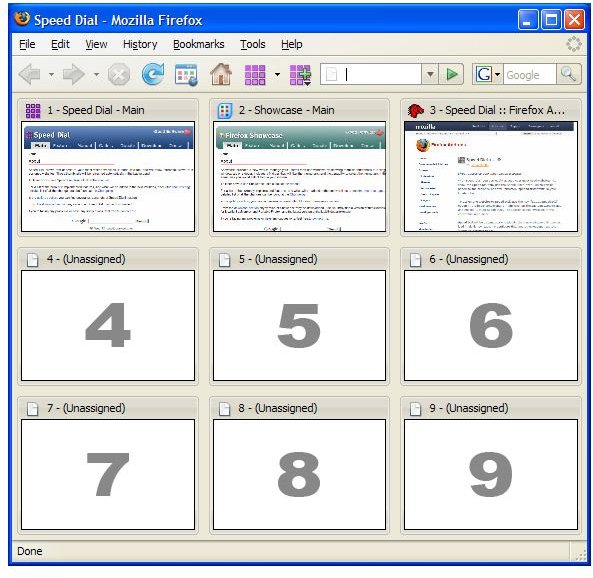
Speed Dial works (with the default setup) by placing 9 clickable thumbnails on your blank tabs, which are usually the ones you just opened to start browsing a new page, so it is a perfect place. The thumbnails are 100% set by you and there are no defaults that lead you to ad pages or anything like that. (See Speed Dial Main image)
So, you put your 9 most visited sites on the page and now you have a way to access them faster than bookmarks and without remembering hot keys or short names. Now, you are thinking, that is pretty cool, but it won’t boost my productivity. Touchee.
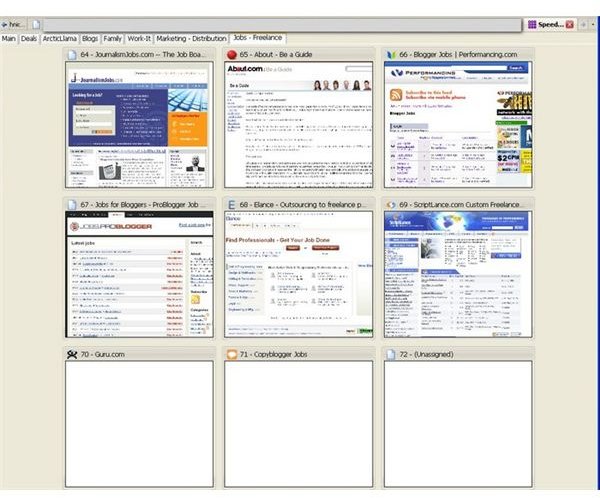
Where the productivity boost comes in is with the multiple tabs available inside of Speed Dial. (See Speed Dial Tabs Image) As you can see from my screenshot I have tabs for my Main sites, as well as my Deal (finding good deals on stuff) websites, as well as my professional sites, my blogs, sites I use for my personal family life, sites for marketing, and sites for finding new freelance jobs. The work-it tab is where I put things that I want to keep working on, but don’t really have a permanent home for yet. Things like building profiles or signing up for networking directories, and so on.
Now, based on each part of my day I have my sites right at my finger tips. I start each day by searching for new opportunities for my freelance writing business . My 9 best job hunt sites are right there ready to go. (Actually those are sites 2-11, my best two are on Main). But, when I’m done with that part of my day, I don’t have to worry about all these sites popping back up just to get closed down. Instead, when it is time to do some marketing from my home office, I click the Marketing tab and I’m off to my best 9 marketing sites.
You can customize Speed Dial to do more or less for you including smaller thumbnails and setting it up to be less intrusive if you want to activate it manually (but why?).
Adding sites is as easy as right-clicking the tab of the open page that you want to add and choosing Add to Speed Dial. You choose the tab and position number in seconds, and next time you open that tab, your site will be there. It is perfect for making sure that you don’t forget about new resources for your home office business.
Get It
For security reasons, everyone should download their plug-ins from the mozilla site, but the Speed Dial site is at https://speeddial.uworks.net/ if you want to read more.
Download it here: https://addons.mozilla.org/en-US/firefox/addon/4810
Images