Guide to Installing and Using Dingbats in Programs

Understanding Dingbats
Dingbats are fonts that are pictures or shapes. They are often used in graphic programs. Programs like Photoshop, Illustrator, Fireworks, and Paint Shop Pro are great for using dingbats. You can also use these dingbats in word processors. Using your Home Office computer you can create anything with dingbats. You can create things like invitations, calendars, postcards, logos, and more. The Cross to the right was created using dingbats. This tutorial will show you how to use your home office to download, install, and use dingbats.
Finding and Downloading Dingbats
For this tutorial we are going to use urban fonts.com to download the dingbats. Once you have learned how to download, install, and use dingbats, you can search google for other dingbat sites. There are many websites that offer dingbats and majority of them are free to download. Go ahead and load the urban fonts site in a new tab or browser. At the top of the site, you will notice the different categories. Above the categories you will see the Free Dingbats link. Click that link to navigate to the dingbats section. On the dingbats page you will see all of the categories at the top. Click a category to view the dingbats.
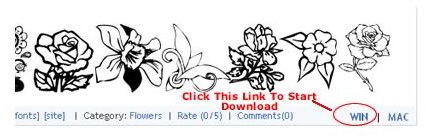
The dingbats page will load and you will see the different dingbats in that category. If you are using dial up, it may take a minute or so for the dingbats to load. Be patient, they will load. When you find a dingbat that you want to download, click the Win link at the far right of the box. A box will open and ask what do you want to do with the file. Click Save File and click OK. It will only take a second to download. Dingbats are small in size.
Unzipping and Installing the Dingbats
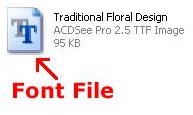
Now you are ready to unzip and install the dingbat that you just downloaded. Double click the file that you downloaded. You will need to extract the file. If you are using Winzip, click the Extract button. If it opens in a folder, click Extract All. A folder will open and you will need to look for the font file. The font file looks like the file on the left. You will need to right click on the file and click Copy from the menu.
Next, we will navigate to the font folder. Go to the My Computer. Then double click on the main hard drive, in most cases, this is C:/. Next, find the Windows folder and double click it. Locate the Fonts folder and double click it. Now you can right click and paste the font file that you copied in this folder. You will see a lot of font files in the font folder. Your dingbat is now installed on your Home Office computer.
Now you can start using your new dingbat. Open your word processor or a graphic program. Type some text and change the font to the dingbat that you just installed. Your text will now turn into the dingbat that you downloaded and installed. You can now download other dingbats and start using them.
References and Image Credits
Photoshop.com
Screenshots were provided by the author for educational purposes only.