Train Signal is a leader in CBT training for IT Professionals. Their Microsoft Exchange Server 2007 training on DVD helps administrators keep current with the most popular corporate messaging solution.
Introduction
Train Signal is a leader in Computer-Based Training (CBT) offerings for the Information Technology community. Their top selling Exchange Server 2007 training videos were available around the time Microsoft released Service Pack 1 for Exchange 2007. The Exchange 2007 videos are available in a set of two DVDs with the content written and presented by fellow Microsoft Exchange MVP, David Shackleford .
Setup and Installation (4 out of 5)
One of the best features of Train Signal training videos is that there is no major installation required. The workstation playing the set of WMV files uses browser embedded Windows Media Player by default. The approriate codecs are required (and are included with WM9 and greater) and hardware (video and speakers/headphones). The menu application [See Figure 1] (Compiled Adobe Flash) is launched directly from the DVDs or from a local or network drive (by copying DVD contents). I didn’t have any issues launching the training videos on Windows XP or Windows Vista. I was not able to watch the videos from my Linux workstations.
The videos run well in either Internet Explorer or Firefox . The latter requires the Windows Media Player plug-in for Firefox . If it is not installed, Firefox will prompt for download.
Performance and Value (5 out of 5)
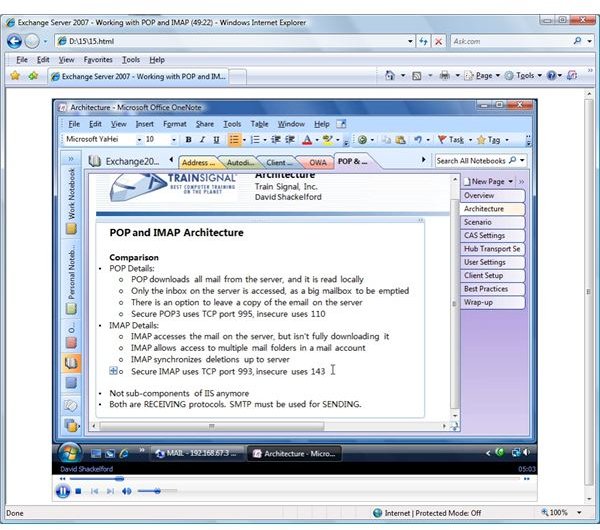
Train Signal’s Exchange Server 2007 training videos are great. The presenter goes over a broad range of topics and thoroughly covers the basics needed by any Exchange administrator looking at Exchange 2007. An ongoing case study accompanies the instruction as we watch the presenter configure the Exchange server for the fictitious cashcowcapital.com. I really like the use of Microsoft OneNote to host the slides [See Figure 2]. The viewer can see the tabs on the right of the player to see the progress of the session. Remote Desktop sessions are used to access the Exchange 2007 Servers to demonstrate configuration.
The content is well presented and informative. Overall, the product is a great value for Exchange 2007 training. I would say that there could be more reference to Exchange Server 2007 Service Pack 1 updates and differences. The videos seem based on SP1, but there are more opportunities for explicitly defining the SP1 requirement.
The Table of Content for the 2 DVD set reads as follows:
- Pre-Installation Preparation
- Installation Overview
- Exchange Server Management Console
- Exchange Management Shell
- Exchange Server 2007 Database
- Going Live with Exchange Server 2007
- Working with Recipients in Exchange Server 2007
- Configuring Public Folders in Exchange Server 2007
- Configuring Address Lists in Exchange Server 2007
- Configuring Outlook Autodiscover
- Configuring the Client Access Server
- Outlook Web Access
- Working with POP and IMAP
- Looking at Hub Transport
- Meeting Compliance Requirements with Exchange Server 2007
- Edge Transport Role
- Configuring Edge Anti-Spam Components
- Anti-Virus and Exchange Server 2007
- Configuring Exchange Server 2007 Backups
- Exchange Server 2007 Disaster Recovery
- Transport Layer Security
- Advanced Mailbox Topics
- Exchange Tools and Troubleshooting Techniques
- Integrating SharePoint with Exchange Server 2007
There is very little if anything really missing from this basic set of training videos and the last video on Sharepoint integration is a bonus.
Annoyances (3 out of 5)
There are a few minor annoyances associated with this production. When the application is launched, there is a loud train horn announcing the application. If you are studying at home after the family is asleep, you might want to make sure the speakers are turned down prior to engaging the video menu.
The presenter speaks well, but with little emotion and at a fairly slow pace. I did enjoy the few dry comments found throughout though (ie, the trendy iPhone comments in the IMAP section). This is perfect for many audience members, but I kept looking for a way to speed up the videos by 5 or 10%.
The menu options, as listed in the above section, are split across 2 DVDs. Neither the box nor the physical DVD lists the topics covered on the DVD. If I want to view the section for Outlook Web Access, for example, I am not able to check which DVD that topic resides on without inserting the DVD and launching the application.
When launching a video topic from the Train Signal menu interface, I am not able to force the product to use a new browser window. The application seems to default to a new tab on an existing instance of Internet Explorer. In addition, selecting another menu item while one was still playing did not reuse the existing instance, but rather opened another new tab leaving multiple videos playing concurrently.
Summary
Train Signal’s Exchange Server 2007 training is a solid option for bringing administrators up to speed on the new architecture and features of Exchange 2007. If you are looking to pass the 70-237 and 70-238 exams, Train Signal’s DVDs, combined with some hands-on experience with Exchange 2007 in production or in the lab, will provide a good foundation of knowledge needed to pass the tests. The minor annoyances do not overwhelm the quality of the training and the value of the product as a whole. And of course, if you are not satisfied with Train Signal’s products, they do offer a surprising 100% satisfaction guarantee.
Screenshots