Telephony client Skype allows users to access their Outlook contacts and make calls to contacts with telephone numbers.
Accessing Outlook Contacts with Skype
Skype , currently in version 3.8, is a software application for phone and video communication. Calls can be initiated from computer to computer or computer to phone. Incoming calls can also originate from a phone or computer as well. Microsoft Outlook as a Personal Information Management (PIM) tool can be used to store contact information, including phone numbers. Companies may use Outlook with a Customer Relationship Management (CRM) application or add-on as well. In either case, when Outlook and Skype are installed on the same workstation and both are open, Skype can access and display Outlook contacts.
Viewing and Calling Outlook Contacts in Skype
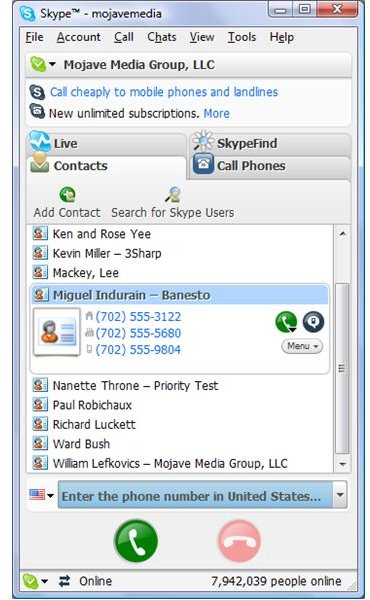
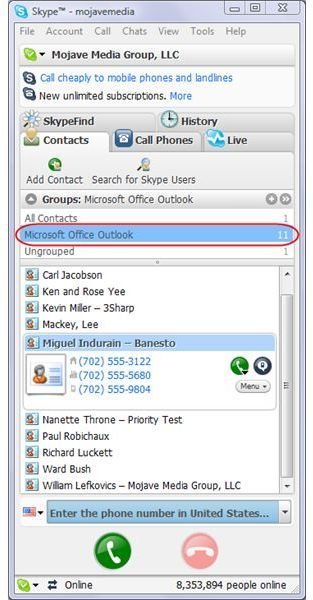
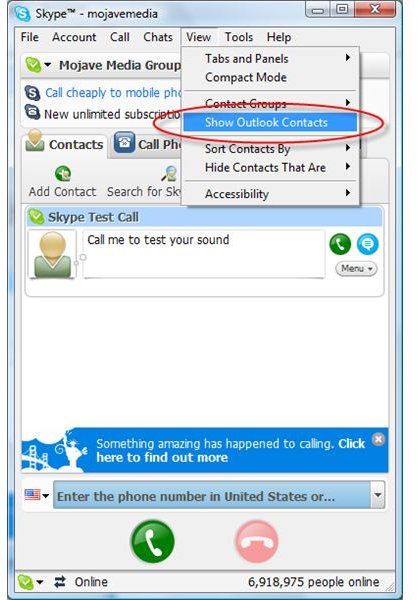
To view Outlook contacts in Skype , select Show Outlook Contacts on the Skype View menu [See Figure1]. Upon selection, Skype will pull only contacts with phone numbers in any of the three main number fields in Outlook - Home, Business and Mobile. These contacts are displayed by name in Skype [See Figure 2]. Placing a call to an Outlook contact is done in the same manner as any other contact through Skype. You can select the contact and the appropriate number if multiple numbers exist for that contact. Either click the green button with the telephone handset next to the chosen contact [See Figure 2] or select Call | Call To from the Skype menu. If you enable Contact Groups in Skype, found in View | Contact Groups | Enable Contact Groups, you will see a group automatically created to represent the Outlook contacts. For Outlook 2007, this is shown as Microsoft Office Outlook [See Figure 3].
One benefit of accessing Outlook contacts stored in Outlook is that you do not have to maintain multiple sets of contacts. Changes to Outlook contacts are shown in Skype when those contacts are reloaded, either when Skype starts or by deselecting and reselecting Show Outlook Contacts from the Skype View
Skype Screenshots